

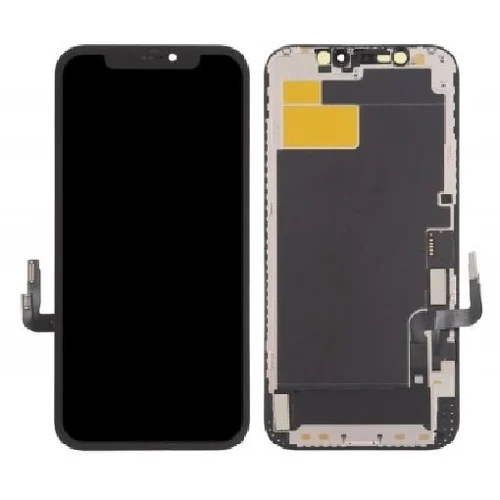
Apple Iphone 17 Pro Max Screen Replacement
Availability:In Stock!
- Super Retina XDR” OLED display
- LTPO technology (allows variable/adaptive refresh rate)
- Diagonal size: 6.9-inch all-screen display
- When measured as full rectangle: ~6.86 inches
- Resolution: 2,868 × 1,320 pixels
- Pixel density: ~460 ppi
KSh 35,000.00
CompareApple Iphone 17 Pro Max Screen Replacement Description
The Apple Iphone 17 Pro Max Screen Replacement is one of its most critical components, serving as the primary interface between users and the device. As such, the importance of screen protection cannot be overstated. Without adequate protection, the screen is vulnerable to common types of damage, such as cracks, scratches, and shattering, which can significantly impair the functionality and aesthetics of the device. A damaged screen not only affects usability but can also lead to costly repairs or, in some cases, a complete device replacement.
Cracks may disrupt touch sensitivity or obscure visibility, making day-to-day tasks challenging. Scratches can accumulate over time, resulting in a poor visual experience when using the device. It’s essential to recognize that even minor damage can escalate if left unaddressed, potentially leading to more severe internal issues. Therefore, effective screen protection is vital for maintaining the integrity and longevity of the iPhone 17 Pro Max.
There are various ways users can safeguard their screens against anticipated damage. Utilizing high-quality screen protectors, such as tempered glass or durable films, offers a robust first line of defense against scratches and impacts. Additionally, investing in protective cases that provide sufficient bumper protection can prevent direct pressure on the screen during drops or falls. It is also essential to adopt careful handling techniques, such as placing the device in a secure pocket away from sharp objects and ensuring it is not overloaded with heavy items that may cause crushing damage.
By prioritizing screen protection, users can enhance the longevity and functional performance of their Apple iPhone 17 Pro Max, ensuring that they enjoy a seamless user experience throughout the lifespan of the device.https://humtechke.com/wp-admin/post.php?post=39922&action=edit
When to Replace Your iPhone 17 Pro Max Screen
Identifying the right time to replace the screen of your Apple Iphone 17 Pro Max Screen Replacement is crucial for maintaining its performance and usability. Several critical indicators can suggest that your device’s screen requires immediate attention. One of the most apparent signs is physical damage. This includes cracks, chips, or any other visible imperfections that hinder your ability to use the device effectively. Such damage not only affects the aesthetic appeal of the iPhone 17 Pro Max but can also lead to more significant issues if left unaddressed.
Another common issue that may necessitate a screen replacement is performance problems. Users may experience unresponsive areas on the touchscreen, which can impede interactions with the device. This may manifest as zones of the screen that do not register touches or swipes, causing frustration and inefficiency in everyday tasks. Such performance degradation often calls for a thorough examination to determine if the malfunction is due to hardware failure or software glitches.
Visual problems are equally telling when assessing the need for a screen replacement. Discoloration, screen bleeding, or any abnormalities in color accuracy can severely diminish your iPhone 17 Pro Max experience. These issues often affect viewing angles and can even contribute to headaches or eye strain during extended use. When facing such problems, it is essential to evaluate the severity of the damage and consider whether it warrants repair or complete screen replacement.
Ultimately, ascertaining the extent of the damage is vital. If multiple issues are present, or if the damage is extensive, a professional assessment may be necessary to decide the most prudent course of action. Replacing the screen may restore your device’s functionality and help you avoid further complications.
Step-by-Step Guide to Replacing the iPhone 17 Pro Max Screen
Replacing the screen of an Apple Iphone 17 Pro Max Screen Replacement can seem daunting, but with the right tools and a careful approach, it can be accomplished successfully. To begin, gather the necessary tools: a suitable screwdriver set, a suction cup, a plastic opening tool, and tweezers. Additionally, a replacement screen specifically designed for the iPhone 17 Pro Max is essential, as this ensures compatibility and functionality.
Before proceeding, it is crucial to take safety precautions. Turn off the device completely and remove the SIM card to prevent any potential short circuits. Work in a clean and well-lit area to avoid losing tiny components. Using an anti-static wrist strap can help mitigate the risk of electrostatic discharge that could damage sensitive internal parts.
Start by using the appropriate screwdriver to remove the screws located near the charging port. Once the screws are removed, gently apply the suction cup to lift the screen slightly, allowing space for the plastic opening tool. Carefully insert the opening tool to separate the adhesive without damaging internal components. Gradually work around the device to loosen the screen all the way around.
Once the screen is detached, disconnect the battery before working on removing the damaged screen. This critical step prevents any electrical hazards while disconnecting ribbon cables attached to the display. Use the tweezers to handle the cables carefully to avoid tearing them. After these connections are free, you can remove the damaged screen entirely.
The installation of the new screen involves reversing these steps. Align the new screen with the device frame, ensuring all connections are secure before reattaching the screws. Once the screen is firmly in place, power on the device to test the functionality of the new display. If everything works correctly, reinsert the SIM card and enjoy your repaired iPhone 17 Pro Max.
Professional Repair vs. DIY Replacement: Pros and Cons
When faced with a damaged Apple Iphone 17 Pro Max Screen Replacement , users often grapple with the decision between enlisting professional repair services or undertaking a DIY replacement. Each option presents its unique advantages and disadvantages, influenced by various factors including cost, skill level, warranty implications, and the quality of replacement parts.
One notable advantage of professional repairs is the expertise that technicians bring to the table. These professionals possess the necessary skills and experience to assess and address complex issues effectively, thereby reducing the risk of additional damage that might occur during a DIY attempt. Furthermore, most reputable repair services offer warranties on their work, providing users with peace of mind regarding the longevity of the repair.
However, the cost associated with professional repairs can be a significant drawback. Authorized repair shops may charge a premium for their services, which can be prohibitive for some users. Additionally, repair times can vary depending on the workload of the service center, potentially leaving the user without their device for an extended period.
In contrast, do-it-yourself (DIY) screen replacement can be much more budget-friendly. Users who are confident in their technical abilities can often find complete kits available for the iPhone 17 Pro Max at a fraction of the cost of professional services. However, DIY replacement requires a certain level of skill, and errors in the process can lead to further complications, such as improper installation or voiding the device’s warranty.
Moreover, the availability and quality of replacement parts can significantly impact the outcome of a DIY project. Genuine parts are typically more reliable but also more expensive and harder to source. Meanwhile, aftermarket components may vary in quality, with some offering satisfactory performance but others leading to unsatisfactory results.
In conclusion, the choice between professional repair and DIY screen replacement hinges on individual circumstances, including budget constraints, time availability, and technical know-how. Understanding the pros and cons of both pathways will enable users to make a well-informed decision regarding their iPhone 17 Pro Max repair needs.


There are no reviews yet.