

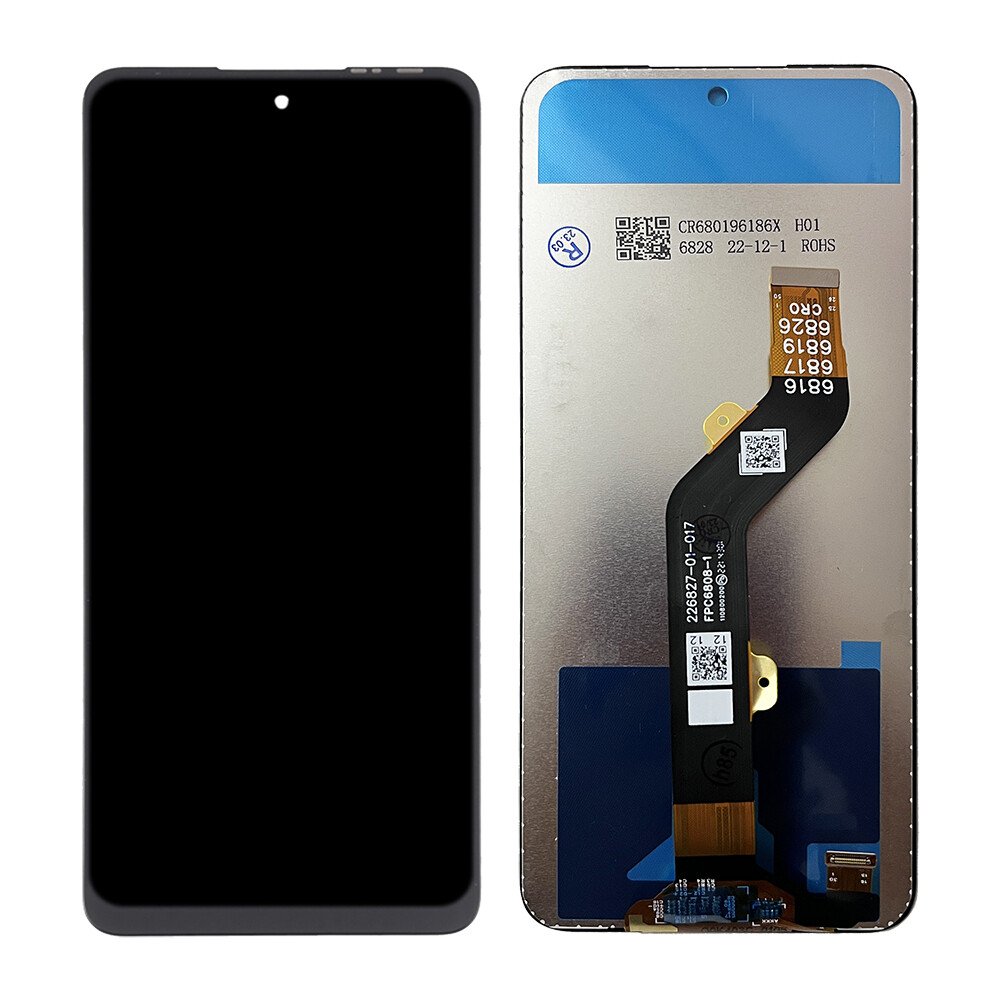
Infinix Hot 60i (X6728B) Screen Replacement
Availability:In Stock!
-
Model: Infinix Hot 60i (X6728B)
-
Screen type: LCD + Touchscreen
-
Size: 6.6 inches
-
Resolution: HD+
-
High touch sensitivity
-
Durable glass protection
-
Compatible with Infinix Hot 60i (X6728B) only
KSh 3,500.00
CompareInfinix Hot 60i (X6728B) Screen Replacement Description
The Infinix Hot 60i (X6728B) Screen Replacement features a vibrant display that plays a significant role in the overall performance of the device. It is equipped with a 6.6-inch IPS LCD screen, which ensures that users enjoy bright and clear visuals. The resolution of 720 x 1600 pixels provides a decent pixel density, making images and text appear sharp and detailed. This quality is essential for tasks such as browsing the web, watching videos, or engaging in gaming, as it enhances the overall user experience.
Furthermore, the display is designed to support various aspects of usability, including full-touch sensitivity and a wide viewing angle. The IPS technology enables accurate color reproduction and better visibility under different lighting conditions. However, despite its robust design, the display is not immune to issues that can arise with everyday use. Users often encounter problems such as cracks from accidental drops, scratches from rough surfaces, or compromised touch sensitivity resulting from extended exposure to moisture or heat.
Understanding the role of the display in the Infinix Hot 60i is vital, as it directly impacts user interaction with the device. A high-quality screen facilitates a smooth and enjoyable experience, allowing for seamless navigation and content consumption. When the display starts malfunctioning, it may lead to frustrating interactions, prompting the need for a replacement. In light of this, it is crucial for users to recognize the factors that contribute to display quality and the common issues they may face. This knowledge will assist in making informed decisions regarding screen replacement and maintenance, ensuring the device continues to perform optimally.
Signs You Need a Screen Replacement
Knowing when to replace the screen of yourInfinix Hot 60i (X6728B) Screen Replacementis crucial in maintaining the device’s functionality. One of the most noticeable signs that a screen replacement may be necessary is display flickering. If you observe random changes in brightness or unstable visuals, it is indicative of an underlying issue that could worsen over time. Flickering displays can affect user experience, making it essential to address this problem promptly.
Another critical sign is the presence of dead pixels on the screen. Dead pixels appear as small black dots that fail to display colors, disrupting the visual appeal of the display. If you identify multiple dead pixels or a cluster, it may signify the need for a screen replacement. Additionally, you should examine the glass for any visible fractures. Cracked or shattered glass can not only impair the aesthetic of your Infinix Hot 60i but also pose a risk of injury.
Furthermore, an unresponsive touch screen is a prevalent symptom indicating potential screen failure. A device that fails to register touch inputs can significantly hinder usability, suggesting that the digitizer might be damaged. In such cases, performing a thorough inspection of the screen is recommended. Look for signs of physical damage, assess the responsiveness of the touch function, and determine if there are any software issues affecting performance.
Ultimately, when assessing whether a repair is feasible, consider seeking professional assistance to evaluate the extent of the damage. In some instances, minor issues can be resolved with a simple repair, while more severe problems may necessitate a complete screen replacement. Empowering yourself with this knowledge allows for informed decision-making regarding the health of your Infinix Hot 60i’s display.
Steps for Replacing the Infinix Hot 60i Screen
Replacing the screen of the Infinix Hot 60i (X6728B) Screen Replacement) is a task that can be accomplished by both professionals and DIY enthusiasts. To ensure a smooth and effective screen replacement, it is crucial to have the right tools and materials on hand. First, gather the necessary tools, including a heat gun or hairdryer, a small Phillips screwdriver, a plastic prying tool, tweezers, and a suction cup. Additionally, make sure to acquire a compatible replacement screen specific to the Infinix Hot 60i model.
Prior to commencing the screen replacement process, it is essential to follow safety precautions. Power off the device completely and remove the SIM and memory cards to avoid any potential damage. If possible, work in a static-free environment and wear an anti-static wrist strap. A clean, well-lit workspace will also contribute to a smoother experience.
The screen replacement can be divided into several key steps. Begin by using a heat gun or hairdryer to slightly warm the edges of the device. This will soften the adhesive holding the screen in place. Next, use a suction cup to lift the screen gently, inserting a plastic prying tool to separate the screen from the frame. Proceed carefully, as applying too much force may damage internal components.
Once the screen is detached, disconnect the display cable gently using tweezers. Replace the old screen with the new one by connecting the display cable securely to the motherboard. Reverse the disassembly steps to reattach the screen. Ensure that the adhesive is properly aligned and secure. Finally, power on the device to verify the installation’s success.
During this process, potential challenges may arise, such as stubborn adhesive or components that resist detachment. Patience and prudence are key in dealing with these issues. Following these detailed steps will help ensure that the screen replacement process is efficient and successful.
Post-Replacement Tips and Maintenance
After replacing the screen of your Infinix Hot 60i (X6728B) Screen Replacement ensuring its longevity and performance requires attentive care and regular maintenance. One of the most important aspects is the proper cleaning technique. Use a microfiber cloth dampened with a gentle cleaning solution specifically designed for electronics. Avoid oversized, abrasive materials that may scratch the new screen. Remember to wipe gently in circular motions to remove fingerprints and smudges without causing damage.
In addition to cleaning, consider installing a high-quality screen protector. This simple yet effective measure can shield the new display from scratches, cracks, and dust accumulation. There are various options available, including tempered glass and film protectors. Choose one that fits well without interfering with touch sensitivity, ensuring your user experience remains unaffected. Regularly check the protector for any bubbles or tears, and replace it when necessary to maintain optimal protection.
It is also crucial to monitor your device for any signs of issues following the repair. Look out for screen flickering, unresponsive areas, or discoloration. These symptoms may indicate that the replacement was not entirely successful or that further adjustments are needed. If you notice any of these issues, seeking professional assistance is advisable to prevent additional complications.
Moreover, avoid exposing the Infinix Hot 60i to environments that could jeopardize the new screen. Keep it away from extreme temperatures and avoid storing it in places where it is prone to drops or crushing. By following these maintenance tips and being attentive to your device’s condition, you can greatly extend the lifespan of your Infinix Hot 60i display, ensuring that it remains performant and visually appealing for an extended period.


There are no reviews yet.