

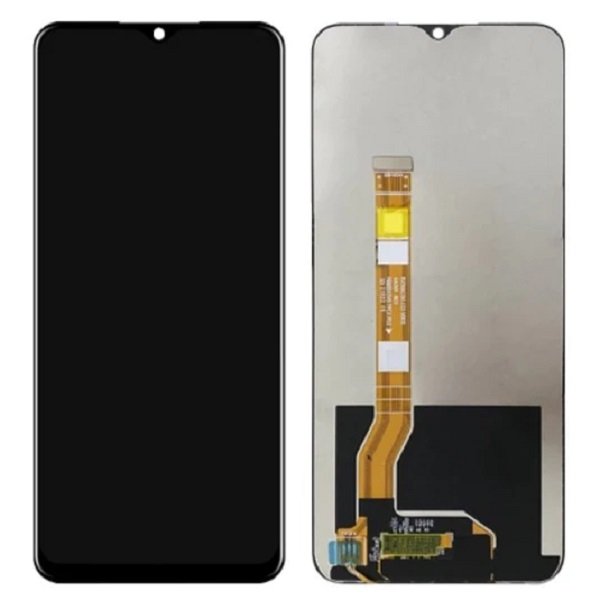
Oppo Reno 12 Screen replacement
Availability:In Stock!
-
Compatible with Oppo Reno 12
-
High-quality display replacement
-
Touchscreen functionality supported
-
Full HD resolution
-
Durable glass panel
-
Precise fit design
-
Professional installation recommended
KSh 9,000.00
CompareOppo Reno 12 Screen replacement in Kenya
The Oppo Reno 12 is a flagship smartphone that encapsulates a blend of modern design and advanced technology. Launched with the intention of delivering high performance and an aesthetically pleasing user experience, the device is distinguished by its sleek body and vibrant display. The Reno 12 features a 6.4-inch Super AMOLED screen, with a resolution of 2400 x 1080 pixels, ensuring that images appear sharp and colors remain vivid. This display not only enhances everyday use but also elevates multimedia consumption, making it a preferred choice for users who frequently engage with videos and games.
The design of Oppo Reno 12 highlights its premium nature, encompassing a glass front and back, complemented by an aluminum frame. This aspect plays a significant role in user experience, as the smooth finish and lightweight attributes contribute to its comfortable handling. Notably, the device also incorporates a fingerprint sensor embedded beneath the display, providing added convenience and a contemporary touch to its functionality.
However, despite its sophisticated engineering, the Oppo Reno 12 is not without potential challenges. Over time, users may experience issues such as screen cracks, pixel malfunctions, or display discoloration, which could necessitate a screen replacement. These problems can severely impact usability, as the display is central to interaction with the device. Moreover, external factors like accidental drops or exposure to liquids often lead to damages that compromise the visual integrity of the screen. Recognizing these common issues is crucial for users, as timely action can mitigate further complications and prolong the device’s lifespan. Therefore, understanding the nuances of the Oppo Reno 12, including its design and potential vulnerabilities, is vital for anyone looking to maintain their smartphone effectively.
Signs Your Oppo Reno 12 Needs a Screen Replacement
Identifying when your Oppo Reno 12 requires a screen replacement is crucial to maintaining the device’s functionality and aesthetic appeal. Several warning signs can indicate that it is time to seek repair services. One of the most apparent signs is a cracked or shattered screen. This damage can arise from accidental drops or impacts and can severely hinder your ability to use the device efficiently. Even small cracks can lead to further damage, including potential harm to the underlying components.
Another common issue is an unresponsive touch screen. If you notice that your device does not register taps or gestures, it may suggest that the digitizer is damaged. This malfunction often leads to frustration, as you cannot navigate your device effectively. In such cases, a screen replacement may be the best course to restore full functionality.
Display discoloration is another notable symptom that should not be overlooked. Users might observe areas of the screen exhibiting unusual colors or brightness levels, which can compromise the visual experience. Such discoloration can indicate a failing display that needs to be replaced to ensure accurate color representation and a better viewing experience.
Lastly, the presence of dead pixels can also signify the need for a screen replacement. These are small dots on the screen that fail to display any color, making them stand out against the vibrant visuals typically offered by the Oppo Reno 12. Even a single dead pixel can be distracting and detrimental to the overall user experience. If you encounter any of these signs—cracks, unresponsive behavior, discoloration, or dead pixels—it is advisable to consult a professional repair service to evaluate the situation and discuss potential screen replacement options.
DIY vs Professional Repair: Which Is Right for You?
When it comes to screen replacement for your Oppo Reno 12, deciding between a do-it-yourself (DIY) approach and seeking professional repair services is crucial. Each option presents distinct advantages and disadvantages that merit careful consideration based on your skills, budget, and the complexity of the repair.
Opting for a DIY screen replacement can be appealing for several reasons. Primarily, it is often more cost-effective than professional repairs. Replacing the screen yourself allows you to save on labor costs, as you would only need to purchase the replacement screen and any necessary tools. Furthermore, there are numerous online resources, including tutorials and video guides, that can assist you through the process, making it accessible for those with a modicum of technical ability.
However, the DIY approach does come with its challenges. The complexity of the repair can vary significantly, and without sufficient expertise, you risk further damaging the device. Additionally, sourcing high-quality replacement parts may be a concern, as inferior components can affect the performance and longevity of your Oppo Reno 12’s screen. Hidden risks such as voiding the warranty or encountering assembly complications are crucial factors to consider when pursuing a DIY method.
On the other hand, professional repair services boast the expertise of trained technicians who possess the necessary tools and experience to ensure a successful screen replacement. While this option typically incurs a higher cost, it mitigates the risk of errors during the repair process. Additionally, reputable repair establishments often provide warranties for their services, which can offer peace of mind regarding future issues.
Ultimately, the decision between DIY screen replacement and professional repair depends on your comfort level with technology and your budget. Evaluating the pros and cons of each can guide you in making an informed choice, aligning your capabilities with the requirements of the repair task at hand.
Gathering the Necessary Tools and Parts
Before embarking on the Oppo Reno 12 screen replacement process, it is essential to gather all necessary tools and components to ensure a smooth and efficient repair. Having the right tools not only simplifies the task but also minimizes the risk of damaging the device during the replacement. The following is a comprehensive list of tools and parts needed for the process.
First and foremost, you will require a few basic tools: a precision screwdriver set, a suction cup, plastic spudgers, and tweezers. Brands such as iFixit and Sunlu offer reliable precision screwdriver kits that are well-reviewed and suited for mobile device repairs. The suction cup is helpful for lifting the screen without causing damage, while plastic spudgers allow for safe prying of the screen edges.
In addition to tools, obtaining the correct replacement screen is crucial. You can choose between OEM (original equipment manufacturer) parts and third-party options. OEM parts are generally recommended for their guaranteed compatibility and quality, though they may come at a higher cost. Websites such as Amazon, eBay, or specialized repair sites like iFixit and RepairZone offer a range of both OEM and third-party screens. When considering third-party screens, opt for brands that have positive customer reviews and warranty policies.
Moreover, it is advisable to purchase a repair adhesive, as the original adhesive often loses its effectiveness after the initial removal. Look for options recommended specifically for mobile device repairs to ensure optimal adhesion of the new screen. Additionally, consider acquiring an anti-static wrist strap to avoid static damage during the repair process.
By carefully gathering these tools and parts ahead of time, you will be well-prepared to carry out the Oppo Reno 12 screen replacement, ultimately leading to a more efficient and successful repair experience.
Step-by-Step Guide to Replacing Your Oppo Reno 12 Screen
Replacing the screen on your Oppo Reno 12 can seem daunting, but with the right instructions, it becomes a manageable task. To begin, ensure you gather the necessary tools including a plastic prying tool, a small Phillips screwdriver, and a suction cup. Before starting, it is essential to back up your data, as the process might result in data loss if something goes wrong.
Your first step is powering down the device completely. Once off, use the suction cup to lift the screen slightly away from the body. Insert the prying tool carefully along the edges to detach the screen without damaging internal components. It’s crucial to work slowly to prevent breakage during this disassembly phase.
After successfully removing the screen, you will need to disconnect the battery to avoid any electrical mishaps. Locate the battery connector and gently pry it out. Next, disconnect the screen’s ribbon cables from the motherboard by lifting the flaps of the connectors carefully. Take note of how everything is connected, as you will need to reverse these steps when installing the new screen.
Now it’s time to place the new screen. Align the ribbon cables and gently connect them, ensuring they are firmly seated in their respective connectors. Reconnect the battery to restore power. It is advisable to test the new screen before sealing the device completely. Turn on the phone and check for functionality and display issues.
If everything appears to be working correctly, proceed to reassemble the phone. Carefully place the new screen into position and press it down, ensuring it is securely fitted. Finally, replace any screws and tidy the edges to complete the installation. With this comprehensive guide, you should be able to successfully replace your Oppo Reno 12 screen without professional assistance, restoring your device to its optimal condition.
Troubleshooting Common Issues Post-Replacement
After successfully replacing the screen of your Oppo Reno 12, you may find yourself facing certain challenges that can affect the overall functioning of your device. It’s not uncommon for users to experience issues such as screen flickering, improper alignment, and touch sensitivity problems. Addressing these concerns promptly can significantly enhance your user experience.
One of the most frequent issues reported is screen flickering. This can occur due to loose connections or improper installation during the replacement process. To troubleshoot this, ensure that all connectors are securely attached to the motherboard. Turn off the device and carefully recheck the display and flex cables for any signs of damage. If the problem persists, consider reinstalling the screen to ensure proper fit and alignment.
Improper alignment of the new screen can also lead to aesthetic and functional problems. If you notice gaps or unevenness at the edges of the display, it may be a sign that the screen was not seated correctly. To rectify this, power down the device, remove the screen, and carefully position it again, ensuring that all clips and adhesive areas are properly aligned and secured. Patience is crucial in this process, as rushing can lead to further misalignment.
Touch sensitivity issues can detract from the usability of your Oppo Reno 12. If the touchscreen does not respond accurately, first check for any debris or protective film that may be interfering with the screen’s functionality. Cleaning the screen with a microfiber cloth can often resolve these issues. Additionally, consider performing a factory reset or recalibrating the touch settings if problems continue. Regular software updates may also enhance touch performance, so ensure that your device is running the latest version.
Maintaining Your Newly Replaced Screen
Once you have successfully replaced the screen of your Oppo Reno 12, it becomes imperative to take proactive measures to maintain its integrity and prolong its lifespan. One of the most effective ways to do this is by applying a high-quality screen protector. A tempered glass protector is recommended, as it provides an additional layer of defense against scratches and impacts. This simple yet essential accessory can safeguard your newly replaced screen against everyday wear and tear, ensuring that it remains in pristine condition for a longer period.
In addition to utilizing a screen protector, best cleaning practices play a crucial role in maintaining the clarity and functionality of your device. Use a microfiber cloth dampened with a small amount of water or a screen-safe cleaner to gently wipe away fingerprints and smudges. Avoid using abrasive materials or harsh chemicals, as these can damage the screen’s surface. Regularly cleaning your screen not only enhances visibility but also helps avoid any buildup that might lead to potential screen degradation over time.
Another vital consideration is physical safeguarding against drops or impacts, which are common threats to smartphone screens. Investing in a sturdy, shock-absorbing case can protect your Oppo Reno 12 from accidental falls. Furthermore, adopting careful handling practices, such as avoiding keeping your device in the same pocket as heavy or sharp objects, can greatly reduce the risk of damage. Awareness of your surroundings also plays a role; being mindful when using your phone in crowded spaces can help prevent unintentional accidents.
Ultimately, maintaining your newly replaced screen involves a combination of preventative accessories, proper cleaning techniques, and mindful usage practices. These steps will ensure that your Oppo Reno 12 remains in excellent condition, providing you with a reliable and enjoyable user experience.
Cost Analysis: DIY vs Professional Services
The decision to replace an Oppo Reno 12 screen can hinge significantly on cost considerations. When evaluating the financial implications of DIY screen replacement versus seeking professional services, it is essential to undertake a thorough analysis of associated expenses. The costs can vary dramatically based on the chosen approach, making it crucial to weigh the merits of each option.
Choosing to replace the screen on your own may initially appear to be the more economical route. The primary costs involved in a DIY approach include the replacement screen and necessary tools. Replacement screens for the Oppo Reno 12 typically range from $50 to $100, depending on the quality and source. Additionally, specialized tools such as screwdrivers, tweezers, and suction cups are often required, which can add another $20 to $50. Thus, the overall expenditure for a DIY project could be between $70 and $150, assuming no additional tools are needed.
On the other hand, utilizing professional services presents a different financial picture. While the convenience of having an expert handle the repair is attractive, it usually comes at a premium. Most professional repair services charge between $150 and $300 for screen replacement, which includes labor and warranty. It is important to consider that some repair shops may tack on hidden fees, such as diagnostics or expedited service charges, which can further inflate the total cost.
Ultimately, the decision should consider not only the monetary aspect but also the confidence in executing the task independently. For those who possess technical expertise and are comfortable navigating the inherent risks, a DIY approach can offer substantial savings. In contrast, those who prefer peace of mind might find the higher price of professional services justifiable.
Where to Find Reliable Repair Services
When your Oppo Reno 12 requires a screen replacement, selecting a reliable repair service is crucial to ensuring the quality and performance of your device remains intact. Here are several methods to identify trustworthy technicians and establishments.
Firstly, reading online reviews can provide invaluable insights into the experiences of previous customers. Websites such as Yelp, Google Reviews, and social media platforms often feature user-generated content that can help you gauge the reputation of local repair services. Look for patterns in the feedback; consistent praise or complaints about specific aspects can be a strong indicator of the service’s reliability.
Secondly, checking for certifications and affiliations with recognized industry organizations is essential. A good repair shop should proudly display any certifications relating to mobile device repair, as these demonstrate adherence to established standards and practices. Additionally, look for those that offer warranties on their repairs, as this reflects their confidence in the quality of their work.
Another effective approach is to ask the right questions. When contacting a repair service, inquire about their experience with the Oppo Reno 12 specifically, as familiarity with the model can significantly impact the quality of the repair. Additionally, asking about the replacement parts they use can shed light on the quality of their service; reputable technicians will opt for OEM (Original Equipment Manufacturer) parts rather than cheap substitutes that could compromise the functionality of your device.
Lastly, seek recommendations from friends or family who have had similar repairs. Personal referrals can often point you towards reliable professionals who have proven their abilities. By combining these strategies, you can enhance your chances of finding a trustworthy repair service for your Oppo Reno 12 screen replacement.


There are no reviews yet.