

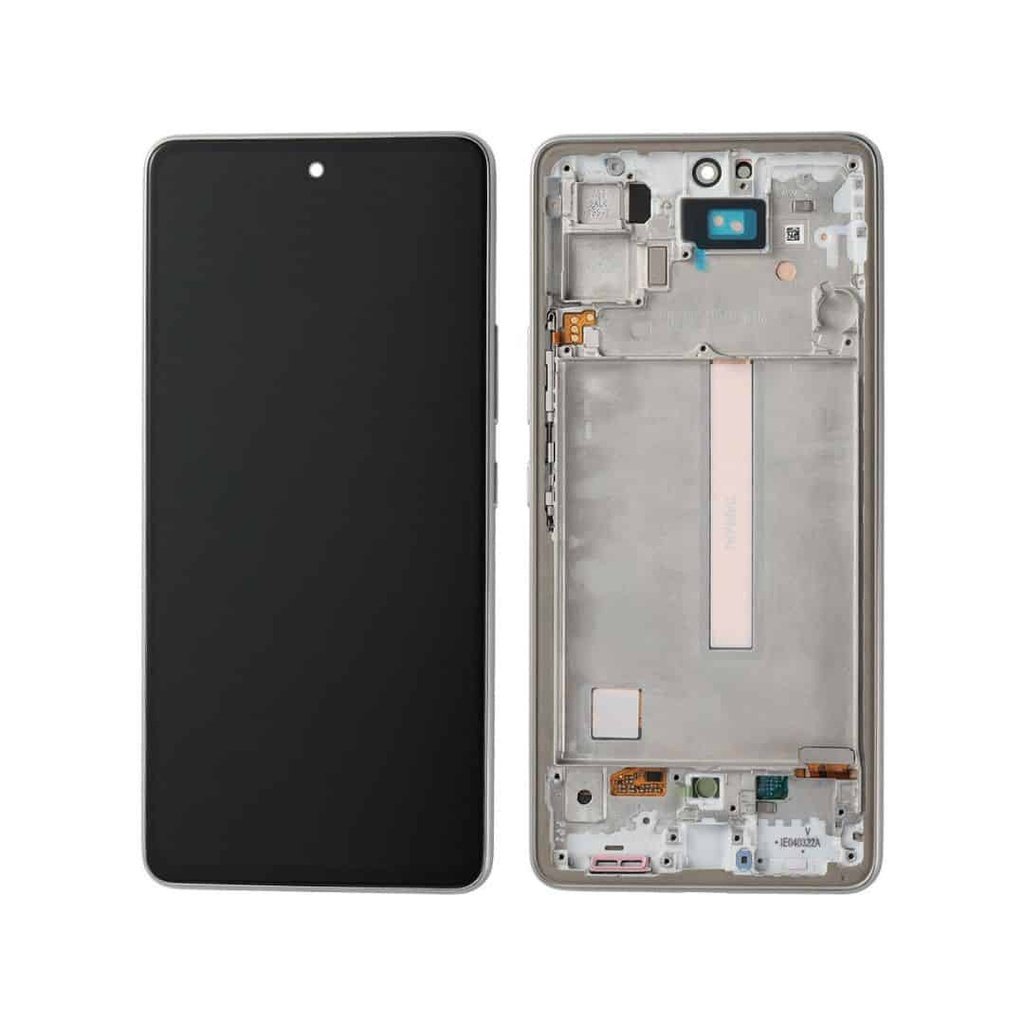
Samsung Galaxy A55 Screen Replacement
Availability:In Stock!
Samsung Galaxy A55 Screen Replacement Features.
-
Original AMOLED display
-
6.6-inch screen size
-
Full HD+ resolution
-
Corning Gorilla Glass protection
-
Touch functionality restoration
-
Frame and screen assembly
-
Professional installation recommended
KSh 11,000.00
CompareSamsung Galaxy A55 Screen Replacement Description
The Samsung Galaxy A55 is a popular smartphone choice among users seeking quality and affordability. However, like any electronic device, its screen is susceptible to damages that may require replacement. Accidental drops are one of the most common reasons users find themselves in need of a new screen. A sudden impact can result in cracks or shatters that compromise the display’s integrity. Such damage often manifests as visible lines, dark spots, or, in worst cases, complete unresponsiveness.
In addition to drops, everyday wear and tear can lead to scratches and abrasions on the screen, which not only obstruct visibility but also diminish the overall aesthetic appeal of the device. While minor scratches might seem negligible, they can worsen over time, especially if the phone is used frequently in various environments. Noteworthy is that the presence of scratches can lead to further damage if left unattended, as they may create vulnerabilities that make the screen more susceptible to breaking.
Internal damage is another critical factor that can necessitate screen replacement for the Galaxy A55. Issues such as water damage can compromise touchscreen functionality, leading to erratic performance or complete failure. Often, the symptoms of internal damage are not immediately visible, which makes it imperative for users to be vigilant about any changes in their device’s performance.
The implications of a damaged screen extend beyond aesthetics; they can greatly affect device functionality and user experience. A cracked or malfunctioning screen can hinder the ability to make calls, send texts, or use applications, leading to frustration. Consequently, users should assess their device promptly if they notice any signs of screen damage, ensuring that they can maintain the full functionality of their Samsung Galaxy A55.
Steps to Take Before Screen Replacement
Before proceeding with a Samsung Galaxy A55 screen replacement, several preparatory steps should be undertaken to ensure a smooth and effective process. The first and foremost step is to back up all important data on the device. This could include contacts, photos, documents, and any other essential information stored on the phone. Utilizing cloud services or external storage options can provide a seamless way to keep this data safe, as screen-related issues could lead to further complications if the device becomes inoperable.
Next, it is crucial to gather the necessary tools and materials required for the screen replacement. Typically, this process demands specific tools such as screwdrivers, prying tools, and adhesive strips. Ensuring that these tools are readily available can help prevent delays and frustrations during the replacement process. Additionally, acquiring a quality replacement screen from a reputable vendor is essential; this ensures compatibility and reliability of the new screen.
Understanding warranty implications is another critical aspect before undertaking the screen replacement. Depending on the terms of the warranty, repairing a device independently may void existing coverage. It is advisable to review the warranty guidelines or consult with the manufacturer for clarity on any potential impacts of self-repair.
Moreover, diagnosing the issue thoroughly before confirming the necessity for a screen replacement is vital. This could involve running troubleshooting steps, such as soft resetting the device or checking for software updates that might alleviate display issues. In some scenarios, the problem might stem from software glitches rather than physical screen damage. By performing these preliminary checks, users can avoid unnecessary costs associated with screen replacement, thus ensuring that the process is both efficient and economical.
DIY vs. Professional Replacement: Pros and Cons
When faced with a damaged Samsung Galaxy A55 screen, users often grapple with whether to attempt a DIY replacement or to seek professional assistance. Each approach has its unique advantages and disadvantages that must be considered carefully.
One of the most significant advantages of a DIY screen replacement is cost savings. Purchasing a replacement screen online and sourcing the necessary tools can be considerably less expensive than paying for professional service. Additionally, performing the repair oneself provides a sense of accomplishment and the opportunity to learn about the inner workings of the device. For individuals with basic technical skills, following online tutorials can make the process manageable.
However, the DIY approach comes with notable risks. Without proper skills and knowledge, there is a potential for further damaging the device, which could result in even more expensive repairs. Complexities arise with delicate components and intricate connections, often leading to unforeseen complications. Moreover, DIY repairs may void any existing warranties or agreements with Samsung, leaving users without recourse if further issues emerge.
On the other hand, professional screen replacements provide a higher assurance of quality workmanship. Skilled technicians are trained to handle intricate repairs, which significantly reduces the risk of additional damage during the replacement process. Furthermore, many repair services offer warranties on their work, providing peace of mind that the screen will function properly. While the upfront cost may be higher, the assurance of a professionally executed repair often justifies the expense.
Time consumption is another factor to consider. A DIY replacement can take several hours, particularly for individuals without experience. Conversely, professionals often complete the task within a shorter timeframe, allowing users to resume their normal activities promptly. Ultimately, the decision between DIY and professional Samsung Galaxy A55 screen replacement hinges on individual circumstances, preferences, and priorities.
Finding Reliable Replacement Parts and Services
When it comes to Samsung Galaxy A55 screen replacement, sourcing reliable parts and services is paramount to ensuring a successful repair. The market offers a variety of options, but choosing the right supplier can protect you from subpar components that may lead to further complications. Start by looking for suppliers that specialize in mobile parts, particularly those with a solid reputation in the industry.
One primary consideration is the distinction between OEM (Original Equipment Manufacturer) parts and third-party options. OEM parts are manufactured by the original producer of the device and generally come with a guarantee of quality and compatibility. Although they may be slightly more expensive, OEM screens often provide better durability and functionality after installation. Conversely, third-party parts, while often less expensive, can lead to inconsistent performance and might void warranties. Therefore, always verify the reliability of third-party suppliers through customer reviews and ratings.
Additionally, it is essential to evaluate whether you prefer local repair services or mail-in options. Local services can provide the advantage of quicker turnarounds, allowing you to have your Samsung Galaxy A55 screen replaced promptly. However, ensure these services have qualified technicians and use high-quality replacement parts. If opting for a mail-in service, check for their track record of professionalism, processing times, and the quality of parts used. A transparent repair process with a clear timeline will contribute to a more satisfactory experience.
Lastly, warranty and guarantee considerations are critical. Reliable suppliers and repair services typically offer warranties on their parts and service. This not only protects your investment but also provides peace of mind knowing that any future issues will be addressed without additional costs. Ultimately, thorough research and defined criteria will lead to informed choices in securing quality replacement screens and services for your Samsung Galaxy A55.


There are no reviews yet.