

-
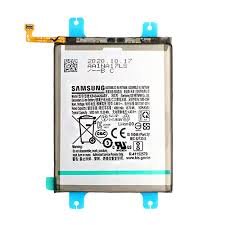
Compatible with Samsung Galaxy M34
-
High-capacity Li-ion battery
-
Voltage: 3.85V
-
Capacity: 6000mAh (typical)
-
Rechargeable and long-lasting
-
Overcharge and overheat protection
-
Lightweight and durable design
-
OEM quality replacement part

Battery Replacement
Samsung Galaxy M34 Battery Replacement
Availability:In Stock!
KSh 1,500.00
CompareSamsung Galaxy M34 Battery Replacement Description
The battery life of the Samsung Galaxy M34 is a critical aspect that affects user experience. Typically, lithium-ion batteries like the one in the M34 are expected to last approximately 2 to 3 years, depending on various factors. Over this period, the battery will naturally degrade due to regular usage patterns, charging habits, and environmental conditions such as temperature. While the Galaxy M34 is designed to optimize battery performance, certain behaviors can significantly impact its longevity.
One of the most common performance issues indicating that replacement might be necessary is rapid battery drainage. If the device’s battery depletes significantly faster than usual during routine tasks, it suggests that the battery’s capacity is diminishing. Additionally, users may notice that their Samsung Galaxy M34 becomes unusually warm during charging or usage, which can be a sign of internal damage or malfunction. Similarly, unexpected shutdowns, especially when the battery indicator shows a relatively high charge, can indicate severe battery degradation.
Several factors contribute to battery longevity. Frequent use of power-intensive applications, such as games and video streaming, can accelerate battery wear. Moreover, improper charging habits—such as consistently charging the battery overnight or using non-standard chargers—may also lead to reduced performance. Temperature conditions play a role as well; exposing the device to high heat or extreme cold can damage the battery and shorten its lifespan. Therefore, to maintain optimal performance, it is essential to adhere to recommended charging practices and provide a moderate operating environment. Recognizing these signs can help users address battery issues promptly, ensuring their Samsung Galaxy M34 continues to function effectively.
Preparing for Battery Replacement
Before embarking on the journey to replace the battery of your Samsung Galaxy M34, it is imperative to prepare adequately. The first step in preparation involves gathering the necessary tools and materials. Essential items include a set of precision screwdrivers, often featuring Phillips and Torx heads, as well as plastic prying tools to safely detach the device’s back cover without damaging it. Additionally, acquiring a replacement battery specifically designed for the Samsung Galaxy M34 is crucial to ensure compatibility and performance.
Moreover, ensuring that you back up your data is vital. A battery replacement may inadvertently lead to data loss, especially if something goes awry during the process. Utilizing cloud services or an external hard drive to safeguard your important files will help mitigate this risk. Powering down the device before starting is another essential step. Shutting off the smartphone not only prevents electrical shock but also protects its internal components from damage during the replacement procedure.
Creating a clean and organized workspace is equally important. A clutter-free area enables you to keep track of the small components, such as screws, which can easily get lost amidst disarray. Additionally, employing an anti-static wrist strap or grounding yourself to avoid static damage is a prudent precaution. Static electricity can cause irreparable harm to the delicate electronics within the Galaxy M34. Therefore, taking these safety measures—such as avoiding working on carpeted surfaces or using metal tools while grounded—will facilitate a safer and more efficient battery replacement process.
Step-by-Step Battery Replacement Process
Replacing the battery in your Samsung Galaxy M34 is a task that requires careful attention and methodical execution. To ensure a successful battery replacement, follow these steps closely. Begin by preparing your workspace; a clean, well-lit area will help mitigate the risk of losing small components. You will need a few essential tools, including a heat gun or hairdryer, a plastic opening tool, and a small Phillips screwdriver.
Start with the back cover of the Samsung Galaxy M34. Carefully apply heat around the edges using the heat gun or hairdryer; this will soften the adhesive, making it easier to remove the back cover. Using the plastic opening tool, gently pry the back cover off, starting at one corner and working your way around. Take your time here to avoid warping or cracking the cover.
Once the back cover is removed, locate the screws holding the battery connector in place. Using the Phillips screwdriver, carefully unscrew them and set them aside. Next, use the plastic opening tool to disconnect the old battery from the motherboard. Take caution not to damage any surrounding components during this process.
With the old battery removed, position the new battery in the same slot, making sure it aligns correctly with the terminals. Once in place, reconnect the battery connector to the motherboard. Secure the screws back in their respective locations to hold the connector firmly. It is imperative to ensure that all connections are tight and that nothing is left loose.
Finally, before sealing your device, double-check that no internal components were disturbed during the process. Align the back cover and press down firmly to ensure a secure seal. Patience is key in this battery replacement process, as rushing can lead to mistakes. Replace your device and enjoy the extended battery life with your newly installed Samsung Galaxy M34 battery.
Post-Replacement Tips and Maintenance
Once you have successfully replaced the battery of your Samsung Galaxy M34, it is crucial to implement several practices that will help optimize your device’s battery life and overall performance. Proper care and maintenance not only enhance the battery’s efficiency but also prolong its lifespan, enabling you to enjoy prolonged usability from your smartphone.
Firstly, it is recommended to establish good charging practices. New batteries often benefit from initial charging cycles. For the first few cycles, charge your Samsung Galaxy M34 to 100% and allow it to discharge to around 20% before recharging. This practice helps calibrate your battery gauge, ensuring accurate readings of remaining power. Additionally, avoiding extreme temperatures during charging is essential—excessive heat can diminish battery capacity and overall functionality.
Secondly, monitoring battery performance through software settings can aid in identifying consumption patterns and potential issues. Samsung devices often come equipped with power management features accessible within the settings menu. Users should regularly check for any applications that may be consuming excess power and consider limiting background activity or utilizing battery optimization modes to extend battery longevity.
It’s also advisable to perform routine maintenance checks on your Samsung Galaxy M34. This should include updating the device software, which can provide new features and improvements to battery management. Furthermore, clean the charging port periodically to ensure there is no debris that could hinder the connection and lead to inefficiencies during charging.
In instances where the battery exhibits unusual behavior, such as rapid draining or swelling, immediate action should be taken. These symptoms may indicate deeper issues that require expertise. Consulting with a professional service center may be necessary to address these concerns effectively, ensuring the continued performance and safety of your device.



There are no reviews yet.