

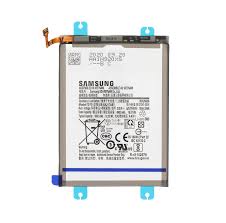
Samsung Galaxy S24 Battery Replacement
Availability:In Stock!
-
Samsung Galaxy S24 Battery Replacement
-
Original 4000mAh battery
-
High performance lithium-ion cell
-
Fast charging support
-
Long-lasting power durability
-
Compatible with Galaxy S24 only
-
Professional installation recommended
KSh 3,000.00
CompareSamsung Galaxy S24 Battery Replacement in Kenya
The battery is a vital component of any smartphone, including the Samsung Galaxy S24. Over time, batteries experience wear and tear, which can significantly affect both the device’s performance and user experience. Understanding the importance of battery replacement is essential for maintaining the longevity of your smartphone and ensuring it operates efficiently.
One of the primary indicators of battery wear is a noticeable reduction in battery life. If your Samsung Galaxy S24 requires frequent charging throughout the day or loses charge rapidly despite minimal usage, it may be time to consider a battery replacement. Furthermore, unexpected shutdowns can be a troubling sign; if your device powers off suddenly while there is still a measurable charge, it could indicate that the battery is failing to provide adequate power. These symptoms not only hinder usability but can also disrupt your daily activities.
Overheating is another critical concern. While smartphones generate heat during standard use, if your Galaxy S24 feels unusually hot during charging or while in operation, it can signal that the battery is under stress or nearing the end of its life cycle. This overheating not only compromises the comfort of use but also poses a risk of damage to internal components. Addressing battery issues promptly can mitigate further complications and protect your device.
Ultimately, timely battery replacement enhances the overall functionality of the Samsung Galaxy S24 while prolonging its operational life. By recognizing the signs of battery deterioration and prioritizing replacement when necessary, users can ensure their devices continue to perform optimally, thus avoiding the inconvenience and frustration that can come from battery-related issues.
Identifying Battery Issues in Your Galaxy S24
Diagnosing battery issues in your Galaxy S24 is a crucial first step in determining whether a battery replacement is necessary or if there are other underlying problems at play. One effective method to begin this process is to utilize the built-in diagnostics feature available on your device. To access this tool, navigate to the settings menu and select “Battery.” Here, you will find insights into battery health, usage statistics, and any necessary optimization suggestions. By examining this data, you can obtain valuable information regarding your battery’s performance over time.
Another important aspect of battery diagnostics is monitoring app power consumption. Some applications may significantly drain your Galaxy S24’s battery without your knowledge. In the settings menu, under the “Battery” section, you can find a list of apps organized by their energy consumption. If certain apps are using more power than expected, consider either updating them, limiting their background activity, or uninstalling them entirely if they are not crucial to your daily activities. Awareness of app usage is vital in managing battery health.
Physical signs of battery damage may also indicate that a replacement is needed. Users should inspect the battery for any swelling, leaks, or unusual heat generation. If you notice any of these symptoms, it is imperative to cease use immediately, as a damaged battery can pose safety risks, including potential fires or further device damage. Careful observation of your Galaxy S24’s performance and physical condition will enable you to determine whether a battery replacement is the best course of action. By addressing these battery concerns proactively, users can extend the lifespan of their device and enhance overall performance.
Choosing the Right Replacement Battery
When it comes to replacing the battery of your Samsung Galaxy S24, making an informed choice is crucial to ensuring optimal performance and longevity. The first decision you need to make is whether to go for an Original Equipment Manufacturer (OEM) battery or a third-party battery. OEM batteries are specifically designed and engineered by Samsung for their devices, ensuring compatibility and reliability. Conversely, third-party batteries may offer budget-friendly alternatives but could come with the risk of less rigorous quality controls.
Key specifications to consider while selecting a replacement battery include capacity, voltage, and dimensions. The capacity, often measured in milliampere-hours (mAh), indicates how much energy the battery can store. A higher capacity battery can provide longer usage time, but it must be compatible with your device’s requirements. Voltage ratings should also match your original battery specifications to avoid any electrical issues. Overall dimensions must be identical to ensure a secure fit within your Galaxy S24, preventing any physical hardware complications.
Where you purchase the battery is equally important to guarantee its authenticity. Authorized Samsung retailers, service centers, or reputable online platforms specializing in smartphone components are ideal places to find replacement batteries. It’s advisable to avoid unknown websites or vendors that are not established, as they may sell counterfeit batteries that can damage your device or pose safety risks. Additionally, always check user reviews and ratings to evaluate the experiences of previous buyers with specific sellers.
Choosing the right replacement battery for your Samsung Galaxy S24 involves careful consideration of OEM versus third-party options, key specifications, and trustworthy purchasing channels. This diligence ensures that you maintain your device’s performance and safety while enjoying a seamless experience with your smartphone.
DIY Battery Replacement: Step-by-Step Instructions
Performing a DIY battery replacement for your Samsung Galaxy S24 can seem daunting, but with the right tools and precautions, it is manageable. This guide outlines the steps necessary to safely complete the battery replacement process. First, gather the required tools: a small Phillips screwdriver, a plastic opening tool, a suction cup, and a tweezers. These tools will help you disassemble your device without causing any damage.
Before beginning the procedure, ensure you have a safe work environment. Power down the Galaxy S24 to avoid any electrical shorts or damage during the replacement. Additionally, it is advisable to wear an anti-static wrist strap to prevent static electricity from harming your device’s internal components.
Once prepared, start by removing the back cover of the phone. Use the suction cup to create an opening at the edge of the back cover; then, insert the plastic opening tool to gently pry it off. Be cautious around the edges to avoid cracking or damaging the back panel. After the back cover is removed, locate the battery connections and unscrew any screws holding the battery in place. Carefully disconnect the battery connector using your tweezers or the plastic opening tool.
Next, remove the old battery by gently lifting it out without applying too much force. Take your new battery and insert it into the compartment, ensuring it sits securely. Reconnect the battery cable and screw any screws back in, securing the battery in its place. Afterward, replace the back cover by aligning the edges and pressing gently until it clicks into position. Finally, power your Samsung Galaxy S24 back on to confirm that the new battery is functioning correctly.
This step-by-step guide provides a comprehensive approach to replacing your Galaxy S24 battery. By taking the appropriate precautions and following the outlined steps, you can enhance your device’s lifespan while ensuring its proper functioning. Should you encounter difficulties, consider seeking professional help to prevent any potential damages.
Professional Battery Replacement Services
For individuals who may not be comfortable undertaking a do-it-yourself (DIY) battery replacement for their Samsung Galaxy S24, opting for a professional battery replacement service can be a practical solution. Utilizing these services ensures that the process is handled by trained technicians equipped with the appropriate tools and expertise, thereby minimizing the risk of damage to the device.
One significant advantage of engaging a professional service is the guarantee of quality workmanship. Reputable technicians not only possess the necessary skills but also have access to genuine parts. This is crucial, as the use of subpar or counterfeit components can lead to diminished performance and shorter battery life. Additionally, professional services often provide a warranty on both the labor and parts, offering peace of mind regarding the longevity and reliability of the new battery.
When considering professional battery replacement services, it is essential to evaluate potential costs. Prices can vary depending on the service provider, geographical location, and whether the replacement includes a new, original battery or an aftermarket alternative. Conducting research and reading customer reviews can assist in identifying a reputable service provider with transparent pricing. Furthermore, looking for establishments that specialize in Samsung devices can be beneficial, as they will have more experience handling particular issues that may arise with the Galaxy S24.
Lastly, while professional battery replacement services may come at a higher cost than DIY options, they provide reassurance and professional support. Many consumers ultimately value the convenience and reliability these services offer, understanding that the investment can prolong the life of their device. By choosing the right service provider, users can ensure their Samsung Galaxy S24 retains optimal performance for years to come.
After the Replacement: Tips to Enhance Battery Life
Once you have successfully replaced the battery in your Samsung Galaxy S24, it is important to implement several strategies to maximize its efficiency and lifespan. The longevity of your new battery is influenced not only by its physical state but also by how you use and manage your device. Here are some practical tips to enhance battery life after replacement.
Firstly, consider adjusting your display settings. The screen is one of the most power-consuming components of any smartphone. Reducing the screen brightness or enabling adaptive brightness can significantly conserve battery power. Additionally, setting a shorter screen timeout duration will prevent the display from remaining active when not in use.
An effective approach to prolonging battery life involves managing apps on your device. Regularly check for and uninstall applications that you do not use frequently. Background apps can drain your battery unexpectedly; therefore, turning off background app refresh for non-essential apps is recommended. Monitoring battery usage through the settings will help identify which applications are consuming the most power, allowing you to make necessary adjustments.
Regarding charging habits, it is advisable to use the original charger and cables that came with your Samsung Galaxy S24, as this can help in maintaining appropriate charge levels. Avoid letting the battery drain completely or charging it to 100% from time to time; instead, aim to keep the battery between 20% and 80% charged for optimal health. Moreover, avoid using the device while it’s charging to prevent overheating, which could potentially shorten the battery lifespan.
Lastly, consider enabling battery saver mode during peak usage times or when you anticipate needing extra battery life, as this feature can help extend usage significantly. By implementing these strategies, you will not only enhance the performance of your newly replaced battery but also enjoy a more efficient user experience.
Common Myths About Smartphone Batteries
Smartphone batteries are often shrouded in myths and misconceptions that influence how users care for their devices. One prevalent myth is that leaving a smartphone plugged in overnight can damage the battery. While it was true for older battery technologies, modern smartphones, including the Samsung Galaxy S24, are equipped with smart charging systems that prevent overcharging. Once the battery reaches 100%, the charger automatically stops supplying power, allowing the battery to maintain its charge without incurring damage.
Another common belief is that you should always fully discharge your smartphone battery before recharging it to enhance its longevity. This, however, is a misconception rooted in outdated battery technology. Lithium-ion batteries, which are commonly used in smartphones, do not require complete discharges. In fact, frequently draining them to 0% can lead to a reduced lifespan. It is advisable to keep the battery charged between 20% and 80% for optimal performance and longevity.
People often think that using third-party chargers or cables will jeopardize battery health. While it is crucial to select reputable brands, many third-party options are designed to meet the necessary standards, making them safe for use. Users should be cautious and choose brands with positive reviews to ensure compatibility and efficiency without risking battery damage.
Finally, there is a widespread belief that a higher number of charge cycles leads to more battery degradation. While it’s true that lithium-ion batteries do wear out over time, managing how you charge your device plays a much larger role in its longevity. Practicing good charging habits and understanding how your Samsung Galaxy S24’s battery functions can greatly enhance its lifespan while debunking these myths.
Recycling Old Batteries Responsibly
As environmental awareness grows, the imperative to recycle old batteries responsibly has never been clearer. Batteries contain materials that, if not disposed of correctly, can release harmful substances into the environment. Therefore, understanding how to recycle batteries, such as those used in devices like the Samsung Galaxy S24, is crucial to minimizing electronic waste.
Many consumers are unaware that batteries have a lifecycle and can be recycled rather than thrown away. It is recommended to research local recycling programs specifically designed for electronic components. Numerous municipalities offer dedicated collection sites for batteries, and many retailers, including electronics stores, often accept used batteries for recycling. Such initiatives help ensure that harmful chemicals do not leach into soil and water systems.
In addition to local initiatives, organizations such as the Rechargeable Battery Recycling Corporation provide resources and information regarding battery recycling locations. These platforms play a significant role in guiding consumers in identifying appropriate disposal methods. Participating in these programs not only protects the environment but also helps recover valuable materials that can be reintroduced into the supply chain.
Additionally, it is essential to follow safe disposal practices. For instance, removing any battery from a device before recycling is advisable, and securing terminals can prevent potential hazards such as short-circuiting. Furthermore, never attempt to disassemble old batteries, as this can create dangerous situations and might result in exposure to toxic substances.
By actively participating in responsible battery recycling and disposal, individuals contribute to a significant reduction in electronic waste. Ultimately, making informed choices regarding battery disposal can lead to a healthier planet for future generations.
FAQs About Samsung Galaxy S24 Battery Replacement
As users of the Samsung Galaxy S24 may encounter battery issues over time, it is essential to address common questions regarding battery replacement. One frequently asked question is whether replacing the battery will void the warranty. The general rule is that if the battery is replaced through an authorized service center, the warranty remains intact. However, if a third-party service provider conducts the replacement, it might affect the warranty coverage. Therefore, users should ensure that they have their battery replaced by a reputable technician to avoid complications.
Another prevalent concern is how to monitor battery health effectively. Samsung provides built-in tools within the Galaxy S24 that allow users to check their battery’s status. Accessing these features can inform users about the overall health of their battery and help in determining if a replacement is necessary. Regular monitoring can help extend battery lifespan by allowing users to notice changes early. Additionally, users can benefit from apps that offer more detailed information regarding battery usage, cycles, and overall performance, alerting them when the battery nears the end of its optimal life.
Post-replacement best practices are often overlooked, yet they can significantly affect the longevity of the new battery. Users are advised to calibrate their new battery by fully charging it to 100% and then letting it drain to about 10% before charging it again. This process helps to maintain optimal battery performance. Furthermore, avoiding extreme temperatures and not allowing the battery to remain completely drained for prolonged periods are also key practices to enhance battery lifespan. By following these guidelines, users can ensure that their Samsung Galaxy S24 continues to perform efficiently even after a battery replacement.


Zacharyhanna –
1mg medicine india: ZenithIndus Rx – medicine purchase online
Zacharyhanna –
JamesNof –
sending medicines from india to usa: ZenithIndusRx – medicine online delivery
JamesNof –
Kevinboync –
online medicine purchase: online medicine booking – order drugs online
Kevinboync –
Zacharyhanna –
lowest prescription prices online india: ZenithIndus Rx – medicines from india
Zacharyhanna –
BryanGop –
https://zenithindusrx.com/# buy medicines from india online
BryanGop –
BryanGop –
https://fronteracaredirect.com/# mexican drug stores
BryanGop –
Zacharyhanna –
buy generic medicines online india: ZenithIndusRx – best site for medicine
Zacharyhanna –
Kevinboync –
mexico prescriptions: FronteraCareDirect – medicine from mexico
Kevinboync –
BryanGop –
https://zenithindusrx.shop/# online medicine booking
BryanGop –
Kevinboync –
medications from india: ZenithIndus Rx – online generic medicine india
Kevinboync –
Zacharyhanna –
online shopping medicine: ZenithIndus Rx – buy medicine online india
Zacharyhanna –
NelsonGrigo –
mexico farmacia FronteraCare Direct mexican drug store
NelsonGrigo –
BryanGop –
https://zenithindusrx.com/# buy medicines online
BryanGop –