

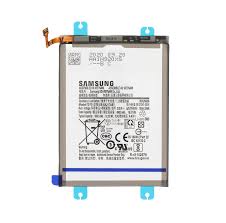
Samsung Galaxy S24 Plus Battery Replacement
Availability:In Stock!
-
Samsung Galaxy S24 Plus Battery Replacement
-
Original high-capacity battery
-
4900mAh lithium-ion cell
-
Fast charging support
-
Long-lasting performance
-
Compatible with Galaxy S24 Plus only
-
Professional installation recommended
KSh 3,500.00
CompareSamsung Galaxy S24 Plus Battery Replacement in Kenya
The health of a smartphone’s battery is critical for the overall functionality and longevity of the device. In particular, the Samsung Galaxy S24 Plus, known for its premium features and performance, relies heavily on an efficient and well-functioning battery. Over time, however, even the most advanced batteries can experience wear and performance degradation, leading users to consider battery replacement as a viable option.
Common indicators that a battery replacement may be needed include diminished performance, where the device fails to maintain a charge as effectively as it once did. Users may notice their Samsung Galaxy S24 Plus depleting battery levels more rapidly, impacting the user experience and making it difficult to complete daily tasks efficiently. Additionally, recurring charging issues can signal an underlying problem with the battery itself. If the device frequently requires charging or displays erratic behavior during the charging process, it may be time for a replacement.
Physical damage also plays a key role in determining whether a battery replacement is necessary. This can include swollen or cracked batteries, which pose risks not only to the device but also to the user’s safety. Addressing such issues promptly—by seeking professional repair services or consulting manufacturer guidelines—ensures that both the device and the user remain protected.
Replacing the battery in a Samsung Galaxy S24 Plus offers several benefits. Enhanced battery health can lead to improved overall performance, providing users with a quicker and more responsive experience. Furthermore, a new battery can significantly extend the lifespan of the device, reaffirming the investment made in a flagship model. Understanding the importance of battery health and recognizing the signs that warrant a replacement are essential steps in maintaining the functionality of your Samsung Galaxy S24 Plus.
Signs Your Galaxy S24 Plus Battery Needs Replacement
The Samsung Galaxy S24 Plus, like any smartphone, relies on a high-performing battery to function optimally. Over time, batteries can degrade, leading to various issues that necessitate replacement. Understanding the signs that your device’s battery may require replacement is crucial for maintaining its performance.
One of the most common indicators of a failing battery is rapid battery drain. If you notice that your Galaxy S24 Plus depletes power significantly faster than it did when new, this could signal a deterioration in battery health. This is especially noticeable if you find yourself charging your device more frequently throughout the day, even with minimal usage.
Another sign is overheating. While some warmth during charging is normal, excessive heat when using the device or during idle periods may suggest an internal issue with the battery. Overheating can not only impact your device’s performance but can also potentially lead to more severe problems if not addressed.
Unexpected shutdowns are also a red flag. If your Galaxy S24 Plus turns off even when the battery indicator shows a reasonable charge, this inconsistency points to a failing battery, struggling to deliver sufficient power. Additionally, if you observe any physical abnormalities, such as a swollen battery, immediate attention is required. A swollen battery can cause damage to the internal components and may pose a safety risk.
To assess your battery health, you can utilize the built-in diagnostic tools available in your device’s settings. Additionally, various third-party applications can provide insights into battery performance and status. Monitoring these signs and acting promptly can extend the life of your Samsung Galaxy S24 Plus and ensure its reliable operation.
Preparing for Battery Replacement
Before embarking on the battery replacement process for your Samsung Galaxy S24 Plus, adequate preparation is essential to ensure a smooth operation. The first step is to back up all data stored on your device. This includes important files, photos, and any applications that hold valuable information. Using Samsung’s Smart Switch or other cloud services can facilitate this process, minimizing the risk of data loss during replacement.
Next, gather all the necessary tools required for the battery replacement. Typically, you will need a set of precision screwdrivers, a plastic prying tool to leverage open the device, and an adhesive remover. An anti-static wrist strap is highly recommended to mitigate the risks associated with Electrostatic Discharge (ESD), which could potentially damage sensitive components inside your smartphone.
Creating a proper working environment is equally crucial. Choose a clean, well-lit area free of clutter to avoid misplacing screws or tools. An organized workspace will not only enhance efficiency but also ensure that all tools and parts are easily accessible during the replacement process. Using an anti-static mat can also provide additional protection against ESD when working on electronic devices.
Finally, it is imperative to consider safety precautions. Ensure that you power off the Samsung Galaxy S24 Plus before initiating the replacement to prevent any short circuits. Handle all components with care, avoiding excessive force or pressure while disassembling the device. Following these preparatory steps will help to facilitate a successful battery replacement, maintaining the integrity of your device throughout the process.
Tools and Materials Needed
When preparing to replace the battery of your Samsung Galaxy S24 Plus, it is vital to gather the proper tools and materials to ensure a successful and efficient process. Having the correct equipment readily available minimizes the risk of damage and streamlines the battery replacement procedure.
First and foremost, you will need a high-quality set of precision screwdrivers. A Phillips #00 screwdriver is typically required to remove the screws securing the back cover and battery connector. Additionally, a Torx T5 screwdriver may be necessary for certain models, so it’s prudent to have both types on hand to avoid interruptions during the process.
Plastic pry tools are another essential item for any battery replacement project. These tools allow users to safely detach the back cover of the Samsung Galaxy S24 Plus without scratching or damaging the device. A spudger tool can also come in handy for gently disconnecting various connectors. As these tools are designed for delicate tasks, they ensure that you do not inadvertently harm sensitive components within the phone.
Next, acquiring a compatible replacement battery is crucial. Make sure to purchase an authentic battery that is specifically designed for the Samsung Galaxy S24 Plus to guarantee optimal performance and longevity. It is advisable to buy from reputable retailers to ensure the quality of the battery.
Lastly, you may require adhesive or sealing elements when reassembling the device. Double-sided adhesive tape is often recommended for securing the back cover, ensuring that the phone maintains its water-resistance capabilities. Some users may also consider using a sealing compound designed for electronics as additional protection against moisture.
In summary, preparing a toolkit that includes screwdrivers, plastic pry tools, a replacement battery, and adhesive materials will facilitate a smooth battery replacement process for the Samsung Galaxy S24 Plus.
Step-by-Step Battery Replacement Process
Replacing the battery of your Samsung Galaxy S24 Plus can significantly enhance its performance and lifespan. This comprehensive guide will provide a clear step-by-step process to assist you in successfully replacing the battery. Before starting the process, ensure that you have the necessary tools handy, including a small screwdriver, a plastic opening tool, and a soft cloth to prevent scratches.
Begin by powering down your device completely. This precaution is vital to avoid any electrical damage during the replacement process. Next, carefully remove the back cover of the Samsung Galaxy S24 Plus. To do this, use the plastic opening tool to gently pry open the edges of the back cover. Take care not to apply excessive force as this may crack the cover.
Once the back cover is removed, you will see the battery seated securely in its compartment. Locate the battery connector, which is usually situated near the bottom of the battery. Using your small screwdriver, unscrew any screws securing the battery connector in place. Carefully disconnect the battery by gently lifting the connector straight up.
Before installing the new battery, it is essential to ensure that the contacts are clean and free from any debris. If necessary, wipe the connectors lightly to achieve a good connection. Align the new battery with the compartment and press it down firmly to secure it in place. Reconnect the battery connector by pushing it firmly back into position.
After the battery is securely connected, it is time to reattach the back cover. Gently press the back cover onto the device, ensuring that it is properly aligned. Finally, power on your Samsung Galaxy S24 Plus to check if the new battery is functioning correctly. It is advisable to monitor the device for a short period to ensure that everything is working as expected.
Post-Replacement Tips and Tricks
Once the battery of your Samsung Galaxy S24 Plus has been replaced, it is essential to take specific steps to ensure optimal performance and longevity of the new power source. Proper calibration of the new battery is critical; this process helps in aligning the battery’s software indicators with its actual capacity. To begin calibration, fully charge the device to 100% and then allow it to discharge completely until the phone turns off due to low battery. This cycle should be repeated a few times to facilitate an accurate reading of the battery’s usage levels.
Managing charging cycles is another vital aspect post-replacement. It is advisable to avoid letting the battery drop to 0% frequently, as this can lead to faster degradation. Instead, maintaining the battery between 20% and 80% charge can prolong its lifespan. Additionally, consider using optimal charging habits, such as using the Samsung-approved charger recommended for the Galaxy S24 Plus, to ensure efficient charging and minimize damage.
Configuring settings on your device will also enhance battery performance. For instance, lowering the screen brightness, and reducing display timeout settings can significantly decrease battery consumption. Enabling battery saver mode during low usage periods can further extend battery life. Additionally, updating applications and the operating system regularly helps in improving battery performance by ensuring that these are optimized efficiently.
Monitoring battery health after replacement is equally important. Utilize built-in battery health features or third-party applications to keep tabs on the battery’s condition over time. Regular checks can alert you to any irregularities, allowing for proactive measures before significant issues arise. Employing these strategies will enhance the performance of your newly replaced battery and extend the life of your Samsung Galaxy S24 Plus.
Common Mistakes to Avoid
Replacing the battery of the Samsung Galaxy S24 Plus can be a straightforward task if approached with care and attention. However, there are several common mistakes that users often make, which can lead to complications or even damage to the device. The first mistake is using incorrect tools. Using inappropriate tools or cheap imitations may lead to stripped screws or damage to the device’s casing. It is crucial to use the recommended tools specifically designed for smartphone repairs to ensure the process is smooth and effective.
Another frequent error is failing to disconnect the battery properly before attempting a replacement. Neglecting to disconnect the battery can result in short-circuiting or damaging internal components of the device. Prior to removing the battery, it is essential to power down the Samsung Galaxy S24 Plus and ensure the disconnection is executed correctly according to guidelines provided by the manufacturer or reliable sources. This step is vital to prevent electrical hazards and ensure the safety of the device.
In addition, users often overlook the importance of sealing the device adequately after replacing the battery. Leaving the device improperly sealed can expose it to dust, moisture, and other environmental factors that can lead to premature wear or malfunction. It is important to ensure that all components are securely reattached and that any adhesive is properly utilized to reform the seals. Taking the time to confirm that everything is reassembled correctly can prolong the lifespan of the device significantly.
By being aware of these common pitfalls associated with replacing the battery of the Samsung Galaxy S24 Plus, users can take preventive measures to avoid unnecessary challenges. Understanding the correct procedures will not only enhance the replacement experience but also contribute to the overall performance and longevity of the device.
When to Seek Professional Help
While many battery-related issues with the Samsung Galaxy S24 Plus can be addressed through do-it-yourself (DIY) methods, there are specific situations where seeking professional assistance becomes essential. Understanding these circumstances is crucial to ensure the longevity of your device and avoid further complications.
One primary scenario warranting professional intervention is when the symptoms extend beyond simple battery deterioration. If your Samsung Galaxy S24 Plus is exhibiting erratic behavior such as frequent crashing, inability to power on, or overheating, it may indicate underlying hardware problems unrelated to the battery itself. In such cases, a technician can perform a comprehensive diagnostic to identify any issues, including faulty internal components.
Another important factor to consider is the warranty status of your device. If your Samsung Galaxy S24 Plus is still under warranty, attempting a DIY battery replacement can void your warranty, leaving you responsible for any future repairs. Consulting with the manufacturer or authorized service center not only protects your warranty but also guarantees that any repairs are carried out with genuine parts, which is critical for maintaining device integrity.
Moreover, if you lack experience in handling mobile device repairs, enlisting a professional can prevent potential mishaps. Mistakes during a battery replacement can lead to further damage to internal components, electrical shorts, or the introduction of harmful elements into the device. Therefore, if you feel uncertain about your capabilities or encounter obstacles during a DIY battery replacement, it is prudent to seek expert help.
In conclusion, understanding when to seek professional help for your Samsung Galaxy S24 Plus battery issues can save time, effort, and potential costs associated with repairs. Always prioritize safety and device integrity when addressing battery complications.
Conclusion and Final Thoughts
The Samsung Galaxy S24 Plus has quickly established itself as a leading choice among smartphone users. However, like any other device, its battery will eventually require attention. Throughout this guide, we have discussed the significance of maintaining optimal battery health, highlighting the impact that a well-functioning battery can have on the performance and longevity of the device. The importance of regular checks and monitoring battery health cannot be overemphasized, as it directly influences user experience.
For those considering a DIY battery replacement for their Samsung Galaxy S24 Plus, it is encouraged to approach the task with careful preparation and confidence. Following the recommended steps and utilizing the right tools can lead to a successful replacement without the need for professional assistance. Nonetheless, it is equally important to recognize one’s limits. If at any point the process feels daunting or complex, seeking professional expertise is a prudent choice. This ensures that the replacement is carried out correctly and safely, thus avoiding potential damage to the smartphone.
In closing, whether you choose to replace the battery yourself or consult a professional, being proactive about battery maintenance will help extend the usable life of your Samsung Galaxy S24 Plus. We invite you to share your own experiences or reach out with questions you may have regarding battery replacement. Engaging with fellow users can provide valuable insights and support. Your input can contribute to a broader understanding of the best practices surrounding battery health and replacement options.



There are no reviews yet.