

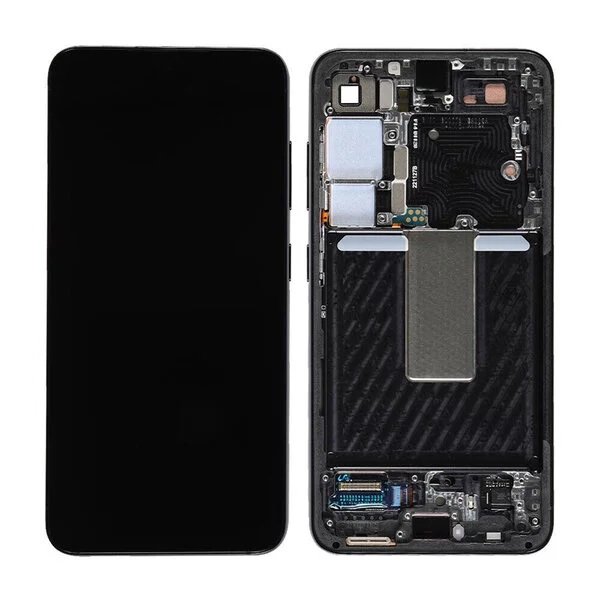
Samsung Galaxy S25 Plus Screen Replacement
Availability:In Stock!
-
Samsung Galaxy S25 Plus Screen Replacement
-
High-quality display
-
Smooth touch response
-
Edge-to-edge clarity
-
Durable glass material
-
Perfect fit design
-
Professional finish
KSh 24,000.00
CompareSamsung Galaxy S25 Plus Screen Replacement in Kenya
The Samsung Galaxy S25 Plus represents a significant step forward in smartphone technology, blending advanced engineering with user-centric features. This device boasts a stunning 6.8-inch Dynamic AMOLED display, providing vibrant colors and sharp contrast that enhance the viewing experience for both multimedia content and everyday tasks. With a resolution of 3200 x 1440 pixels, users can enjoy movies and games with remarkable clarity. Coupled with a high refresh rate, the smooth responsiveness of the screen elevates everything from scrolling through apps to engaging in fast-paced gaming.
In addition to its exceptional display, the Galaxy S25 Plus is equipped with cutting-edge hardware. Under the hood, it features the latest processors and ample RAM, ensuring smooth multitasking and efficient performance. The device also incorporates a robust camera system that excels in low-light conditions, allowing users to capture stunning images regardless of the lighting environment. Furthermore, the long-lasting battery combined with rapid charging capabilities means users can stay connected longer without worrying about running out of power.
However, despite these sophisticated features, the importance of maintaining a high-quality display cannot be overstated. Smartphones, including the Galaxy S25 Plus, are frequently used devices that are vulnerable to accidental falls and impacts, leading to screen damage. This is a common issue faced by smartphone users, often resulting in cracks or scratches that hinder functionality and aesthetic appeal. A damaged screen can pose usability challenges and detract from the overall experience. Therefore, understanding the necessary steps for screen replacement becomes critical for Galaxy S25 Plus users who wish to preserve their device’s performance and visual integrity.
Common Reasons for Screen Damage
The Samsung Galaxy S25 Plus, like many modern smartphones, is susceptible to a range of damages, particularly to its screen. Users often find themselves dealing with cracked screens and other impairments due to various everyday scenarios that can compromise the integrity of the device. Understanding these common reasons can help in mitigating such risks.
One of the primary causes of screen damage is accidental drops. Everyday occurrences, such as having the phone slip from a table or getting knocked off a counter, can lead to severe impacts. The forces exerted during a fall can result in shattered glass or deep cracks, rendering the device difficult to use. Furthermore, the height from which the phone falls and the type of surface it lands on will significantly influence the extent of the damage.
In addition to falls, impact from other objects can also cause screen damage. This may include situations where the phone is inadvertently struck by keys, coins, or other hard objects, especially when placed in the same pocket or bag. Such impacts can create scratches, while in more extreme cases, they may lead to cracks or a complete screen failure.
Lifestyle factors should also be considered when examining reasons for screen damage. For individuals who lead active lives, engaging in outdoor activities can expose the Samsung Galaxy S25 Plus to risks, such as falling while on a hike, where the phone might hit the ground. Moreover, using the device without a protective case or being careless while handling it can further increase the likelihood of breaks and scratches.
Understanding these scenarios can help users take proactive measures to protect their devices effectively, minimizing the chances of costly screen replacements.
Signs You Need a Screen Replacement
The Samsung Galaxy S25 Plus, known for its impressive display quality, may experience issues that necessitate a screen replacement. Recognizing the signs of screen damage is crucial for maintaining the performance and usability of the device. Some common indicators that the screen may require replacement include visible cracks, which can range from minor hairline fractures to more severe breaks that affect touchscreen functionality.
Another significant sign is the presence of unresponsive touch areas on the screen. If certain sections of the display do not register taps or swipes, it can severely hinder the user experience. This could indicate underlying damage to the digitizer, which is the component responsible for touch detection. Users should be vigilant and test different areas of the screen to determine if any parts remain non-functional.
Discoloration on the screen is yet another warning sign. This may manifest as patches that appear distorted or color inaccuracies that affect the overall visual experience. Such issues could potentially stem from physical damage or internal component failure. Additionally, users may observe flickering screens, which can be indicative of a failing display. This flickering may intermittently disrupt regular viewing, making it difficult to use the device effectively.
To assess the extent of the damage, it is advisable to conduct a thorough visual inspection of the screen for both cracks and discoloration. Testing touch responsiveness across the entire display is essential, as is monitoring for any irregular behavior such as flickering. If any of these signs are present, seeking professional repair services is recommended. Addressing screen damage promptly not only enhances the usability of the Galaxy S25 Plus but also protects its internal components from potential further harm.
DIY vs Professional Screen Replacement: Pros and Cons
When faced with a shattered screen on your Samsung Galaxy S25 Plus, the decision between a do-it-yourself (DIY) repair and seeking professional assistance is crucial. Each option carries its pros and cons, impacting both your wallet and the longevity of the device.
Opting for a DIY screen replacement can be appealing due to potential cost savings. Purchasing a replacement screen online, combined with tools such as a precision screwdriver set, suction cup, and adhesive, may result in a significantly lower overall cost compared to professional services. Additionally, the satisfaction of successfully completing a repair can be rewarding for tech-savvy individuals. However, the DIY approach is not without its risks. An improper installation can lead to further damage, malfunctioning parts, or even voiding any remaining warranty on the device.
Conversely, enlisting a professional repair service often guarantees a high-quality outcome. These technicians possess the skills, experience, and specialized tools necessary for an efficient and safe screen replacement. Professional services usually come with warranties on the repair, offering assurance that if issues arise post-repair, they will be addressed without additional cost. Furthermore, professionals are equipped to identify any other underlying issues that may not be immediately apparent to an untrained eye, therefore protecting the device from future complications.
In summary, the choice between DIY and professional screen replacement for your Samsung Galaxy S25 Plus should be approached with careful consideration. Weighing the desire for cost savings against the potential risks of damage should guide your decision, taking into account your technical skills and the value you place on warranty protection and repair assurance.
Preparing for Your Samsung Galaxy S25 Plus Screen Replacement
Before proceeding with a screen replacement for your Samsung Galaxy S25 Plus, it is vital to prepare adequately to ensure a smooth and successful process, whether you choose to undertake the repair yourself or opt for professional assistance. The following steps outline a comprehensive checklist for effective preparation.
First, backing up your data is crucial. Repairs often involve disconnection of components, which may risk data loss if anything goes wrong. Use Samsung’s Smart Switch or any reliable cloud service to secure your important files, including contacts, photos, and apps. This precaution ensures that in the unlikely event of a mishap during the repair, your personal data remains protected.
Next, gather all necessary tools and materials. For DIY repairs, you will require items like a heat gun, suction cup, small screwdrivers, and adhesive strips. You might also consider an anti-static wristband to prevent damage from static electricity. Collecting these tools beforehand will minimize interruptions and streamline the process as you work on your device.
Creating a clean workspace is also essential. Find a dust-free, well-lit area to perform the repair. A cluttered or dirty environment can lead to mistakes and further complications, so ensure that your workspace is organized, and remove any unnecessary items that could impede your efforts.
Lastly, reviewing instructional materials or repair guides cannot be overlooked. Familiarize yourself with the specific steps involved in replacing the screen of the Galaxy S25 Plus. Whether you watch tutorial videos or read detailed articles, understanding the process beforehand will greatly enhance your confidence and effectiveness during the repair.
Step-by-Step Guide for DIY Screen Replacement
Replacing the screen of your Samsung Galaxy S25 Plus can be a daunting task, but with the right approach and tools, it can be done safely and effectively. Before you start, ensure you have a suitable work environment, free from static and clutter. Gather the necessary tools: a heat gun, suction cup, plastic prying tools, tweezers, and a replacement screen.
Begin by powering off your Samsung Galaxy S25 Plus. This critical step prevents any electrical damages during the disassembly. Next, use a heat gun to gently warm the edges of the back cover—this softens the adhesive holding it in place. Once warmed, apply a suction cup to the back panel, pulling lightly to create a gap between the back cover and the phone body. Insert a plastic prying tool into the gap to carefully detach the cover. Pay attention to the clips and adhesive as you proceed.
With the back cover removed, proceed to disconnect the battery to ensure no power is running through the device. This is an essential safety measure. Now, locate the screws securing the screen assembly to the phone and remove them using a precision screwdriver. Store the screws in a safe container to avoid losing them.
Once the screws are out, use the suction cup again to lift the damaged screen gently. Be cautious as you disconnect any flex cables attached to the motherboard. Utilizing tweezers can help maneuver these components. After locating and detaching all connectors, remove the damaged screen completely.
Install the new screen by reversing the process. First, connect the flex cables to the motherboard, ensuring each connection is secure. Follow by reinserting the screws and reconnecting the battery. Finally, reattach the back cover, pressing firmly to ensure a tight seal. It is critical to verify that the phone is free of dust and debris before sealing.
Carefully power on your device to test the new screen functionality. If the replacement was effective, your Samsung Galaxy S25 Plus should be operating as usual. This DIY approach can save time and money, offering a fulfilling experience when done thoughtfully.
What to Look for in Replacement Screens
When considering a replacement screen for the Samsung Galaxy S25 Plus, various factors must be taken into account to ensure quality and compatibility. One of the most crucial aspects to evaluate is the quality rating of the screen. Replacement screens can vary significantly in quality; therefore, selecting a screen that offers high clarity, color accuracy, and responsiveness is essential for maintaining the visual performance of the device.
Compatibility is another vital factor that should not be overlooked. It is imperative to ensure that the replacement screen is specifically designed for the Samsung Galaxy S25 Plus model. Using a screen that does not match the specifications of the original can lead to functionality issues and may even damage the device. Therefore, checking model numbers and manufacturer details prior to purchase is advisable.
Additionally, one should consider the warranty offered by the seller. A good warranty indicates confidence in the product’s durability and performance. Typically, reputable suppliers will provide a warranty period during which the screen can be returned or exchanged if it fails to meet quality standards. This assurance can be critical, especially if the replacement screen encounters issues shortly after installation.
When sourcing replacement screens, it is recommended to choose reputable suppliers or authorized retailers. Purchasing from trusted sources not only guarantees better quality parts but also provides peace of mind regarding after-sales support. Online platforms that specialize in mobile phone parts can be a good option, as they often feature user reviews which can guide your decision-making process. Therefore, carefully selecting both the screen and the source is paramount to ensure proper functionality and longevity of your Samsung Galaxy S25 Plus.
Post-Replacement Care Tips
After replacing the screen of your Samsung Galaxy S25 Plus, it is essential to adopt a proper care regimen to ensure longevity and optimal functionality. First and foremost, handling the device with care is crucial. Always hold the phone securely and avoid dropping it to prevent any impact-related damages. Using a screen protector is one of the most effective measures you can take. A high-quality tempered glass protector not only safeguards the screen against scratches and minor impacts but also provides an additional layer of defense against dust and debris.
When selecting a screen protector, ensure it is specifically designed for the Samsung Galaxy S25 Plus to guarantee compatibility and optimal coverage. Additionally, applying the protector carefully, free from dust or air bubbles, will enhance its effectiveness. Alongside a screen protector, consider investing in a reliable case. A well-fitted case can significantly absorb impacts, reducing the risk of damage from drops and bumps. Look for cases that offer ample edge protection and grippy surfaces to further minimize the chances of accidental slips.
Moreover, being mindful of your device during day-to-day use cannot be overstated. Avoid placing your phone in the same pocket as keys or change, as these objects can cause scratches over time. When using the phone outdoors, ensure it is shielded from extreme temperatures and direct sunlight, as excessive heat can affect the adhesive of the screen and the overall performance of the device.
Regularly cleaning the screen with a microfiber cloth will help maintain clarity and reduce smudging. Avoid using harsh chemicals that can damage the screen’s coating. By being conscientious about how you handle and care for your Samsung Galaxy S25 Plus, you can prolong the lifespan of the newly replaced screen and ensure a better user experience.
Conclusion and Final Thoughts
In conclusion, navigating the intricacies of Samsung Galaxy S25 Plus screen replacement can prove to be a significant yet rewarding endeavor for smartphone users. The essential takeaways from this guide highlight the complexity of the process and the importance of adequate preparation. As you consider your options for screen repair, it is crucial to assess your skills accurately; while undertaking a DIY repair might save you some money, it requires a degree of technical ability and confidence to avoid further damaging your device.
For those who do not possess the required expertise, seeking professional assistance is often a prudent choice. Expert repair services not only ensure high-quality work but also offer warranties on the repairs carried out, providing peace of mind to smartphone owners. These professionals utilize specialized tools and original replacement parts, ensuring the longevity and performance of your Samsung Galaxy S25 Plus remains intact post-replacement.
Additionally, it is essential to implement proper care following a screen replacement to prolong the life of your device. This includes applying a screen protector and using a sturdy case to safeguard against future potential damage. Regularly maintaining and being mindful of your phone’s usage habits can significantly enhance its durability, allowing you to enjoy your Galaxy S25 Plus for years to come.
Ultimately, whether opting for a DIY repair or professional service, being informed and making thoughtful decisions will lead to a successful screen replacement experience. By following the guidelines in this ultimate guide, you can ensure your Samsung Galaxy S25 Plus continues to perform at its best.


There are no reviews yet.