


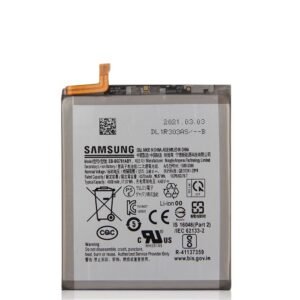
Tecno Spark 40 Pro KM6 Battery Replacement
Availability:In Stock!
KSh 3,000.00
CompareTecno Spark 40 Pro KM6 Battery Replacement in Kenya
The Tecno Spark 40 Pro KM6 is a modern smartphone that has been designed to cater to the needs of users seeking a reliable device that balances performance with affordability. This smartphone boasts a sleek design, making it not only visually appealing but also comfortable to hold. With its dimensions and weight, it fits well within the category of lightweight devices, making it portable for everyday use.
At the heart of the Tecno Spark 40 Pro KM6 is a powerful processor that ensures efficient multitasking and smooth performance across various applications. It excels in handling both everyday tasks such as browsing, social media, and video streaming, as well as more demanding activities like gaming. The device is equipped with an ample amount of RAM, which contributes to its ability to run multiple applications seamlessly, enhancing the user experience significantly.
The display on the Tecno Spark 40 Pro KM6 is another noteworthy feature, offering vibrant colors and sharp visuals that enhance media consumption. Users can enjoy their favorite videos and games in high definition, thanks to the device’s modern display technology. Additionally, the smartphone comes with a robust camera system that caters to photography enthusiasts, enabling them to capture high-quality images and videos with ease.
One of the critical aspects of any smartphone, including the Tecno Spark 40 Pro KM6, is its battery performance. A functional battery is paramount for optimal usage, as it directly influences the device’s longevity and performance throughout the day. Regular maintenance and timely battery replacement when necessary ensure that users can enjoy uninterrupted performance from their device, making it a worthwhile investment for anyone in the market for a new smartphone.
Signs that Your Battery Needs Replacement
Identifying when to replace the battery of your Tecno Spark 40 Pro KM6 is crucial in ensuring optimal performance and longevity of your device. Various indicators can suggest that the battery is no longer functioning effectively. One of the most common signs is rapid battery drainage. If you notice that your phone’s battery percentage drops significantly within a short period, even with minimal usage, it might indicate a degraded battery that can no longer hold a charge efficiently. This kind of issue often arises as the battery ages or endures numerous charge cycles, leading to diminished capacity.
Another clear sign that battery replacement may be necessary is overheating. If your Tecno Spark 40 Pro KM6 excessively heats up during regular activities or while charging, it may indicate a malfunctioning battery. While some warmth during charging is normal, excessive heat can be a warning sign and might even lead to more serious problems if left unaddressed. Overheating can be attributed to internal damage or chemical reactions within the battery, which can further compromise its performance.
Swelling is yet another alarming indicator of battery failure. If you observe any physical deformities such as a bulging back cover or an unusual shape to your device, it is critical to take swift action. Swollen batteries pose a significant risk, not only to the device but also to user safety, as they can rupture or leak harmful substances. If you experience one or more of these symptoms—rapid drainage, overheating, and swelling—it is advisable to seek professional assistance for a battery replacement in your Tecno Spark 40 Pro KM6 to prevent further damage and ensure the device operates smoothly.
Preparing for Battery Replacement
Before proceeding with the battery replacement of your Tecno Spark 40 Pro KM6, it is crucial to take several preparatory steps to ensure a smooth and safe process. The first step is to gather all necessary tools. You will need a precision screwdriver set, a plastic opening tool, and a pair of tweezers. Having these tools on hand will help in safely opening the device without causing damage.
Next, it is essential to create a safe working environment. Choose a clean, flat surface that is well-lit to avoid losing small components during the replacement process. Additionally, consider using an anti-static wrist strap to protect both yourself and the device from static electricity, which can potentially harm the electronic components of the Tecno Spark 40 Pro KM6.
Data protection is another critical aspect of the preparation. Before you disconnect the battery, it is advisable to back up your personal information. This step ensures that all your important files, contacts, and media are stored securely, minimizing the risk of data loss during the replacement procedure. Consider using cloud storage options or transferring data to another device. Also, ensure that your device is powered off completely to avoid any electrical issues during the replacement.
Furthermore, it is recommended to consult the official Tecno user manual or reliable online resources for specific instructions related to your model. Understanding the internal layout and how the battery is connected can save time and help prevent any damage to the device.
In summary, thorough preparation is essential when planning to replace the battery of your Tecno Spark 40 Pro KM6. By gathering the right tools, ensuring a safe environment, and backing up personal data, you can effectively minimize risks and set the stage for a successful battery replacement process.
Step-by-Step Battery Replacement Guide
Replacing the battery in your Tecno Spark 40 Pro KM6 can be a straightforward process when followed correctly. This step-by-step guide will ensure a smooth replacement, suitable for users of various skill levels. Before beginning, gather the necessary tools: a small Phillips screwdriver, a plastic prying tool, and a clean workspace. It is also advisable to have the replacement battery on hand.
Start by powering off your Tecno Spark 40 Pro KM6 completely. This precaution helps prevent any electrical issues during the disassembly process. Next, locate the screws on the back cover. Using the Phillips screwdriver, carefully remove all screws and place them in a small container to avoid losing them. Once the screws are out, use your plastic prying tool to gently separate the back cover from the phone. Take your time with this step to prevent damage to the phone’s casing.
With the back cover removed, you can now see the battery and its connections. Identify the battery connector, which is typically a small clip attached to the mainboard. Gently lift this connector with your prying tool, ensuring you do not apply too much force to avoid damaging the circuit. After disconnecting the battery, carefully remove it from the phone. If it feels stuck, you can use the prying tool to lift it, but be cautious not to bend or damage any internal components.
Now, take the new battery and position it in the battery compartment. Reconnect the battery connector to the mainboard, ensuring it clicks into place securely. Once connected, replace the back cover by aligning it with the phone and pressing until it snaps back into position. Finally, reinsert all the screws you previously removed, ensuring they are tight but not overtightened, to keep your Tecno Spark 40 Pro KM6 in optimal working condition.
Choosing the Right Replacement Battery
Selecting the appropriate replacement battery for the Tecno Spark 40 Pro KM6 is crucial for maintaining the device’s performance and longevity. Several factors must be taken into account during this process, ensuring that the new battery not only fits the device but also meets its operational needs.
First and foremost, it is essential to consider the battery’s capacity, typically measured in milliampere-hours (mAh). A higher capacity battery may provide longer usage times between charges, which is often a significant factor for users who rely on their devices throughout the day. However, one should ensure that the replacement battery has a capacity that aligns with the manufacturer’s specifications to avoid potential compatibility issues or damage to the device.
Compatibility is another critical aspect to assess when choosing a replacement battery. Only batteries designed explicitly for the Tecno Spark 40 Pro KM6 should be considered. Using incompatible batteries can lead to performance problems, including overheating, reduced efficiency, or even complete failure of the device. It is necessary to verify that the battery model matches the one originally installed in the device.
Moreover, sourcing the replacement battery from reputable suppliers is imperative. Authorized service centers or well-established electronic retail stores are generally more reliable options as they often sell genuine parts. Online marketplaces can offer a wide range of batteries, but it is vital to review seller ratings and customer feedback before making a purchase to ensure that the battery is genuine and safe to use.
In conclusion, by carefully evaluating the capacity, compatibility, and sourcing options for the replacement battery, users can ensure that they select a battery that will safely and effectively power their Tecno Spark 40 Pro KM6, ultimately enhancing the longevity and reliability of their device.
Disposing of Old Batteries Safely
Proper disposal of old batteries is essential not only for safeguarding the environment but also for ensuring public health. Batteries, including those from devices like the Tecno Spark 40 Pro KM6, contain hazardous materials that can leach into the soil and water supply if discarded irresponsibly. Therefore, it is crucial to understand local regulations regarding battery disposal, as many regions have instituted guidelines to minimize environmental impacts.
First, it is vital to check local laws regarding battery disposal. Some municipalities offer designated drop-off locations for battery recycling, while others may prohibit the disposal of batteries in regular trash. Failing to adhere to these regulations can result in fines and contribute to environmental degradation. Certain battery types, such as lithium-ion batteries, typically require specialized handling due to their energy content and potential fire hazards.
Recycling is the most recommended method for disposing of old batteries. Many retailers and waste management facilities have implemented recycling programs that allow consumers to return used batteries. These programs help ensure the safe management of hazardous materials and promote the recovery of valuable resources. Organizations focused on electronic waste recycling often provide options for consumers looking to dispose of batteries responsibly, contributing to environmental sustainability and resource conservation.
If recycling facilities are not accessible, individuals can store their old batteries safely until they can be properly disposed of. It is advised to keep them in a cool, dry place, away from flammable materials and out of reach of children or pets. By taking the time to properly dispose of old batteries, individuals can play an integral role in protecting the environment and promoting sustainability for future generations.
Tips for Extending Battery Life
Extending the battery life of your Tecno Spark 40 Pro KM6 is vital for maintaining optimal performance and enhancing user experience. Adopting effective practices for charging, usage, and maintenance can significantly prolong the lifespan of your device’s new battery. Here are some strategies to consider:
First and foremost, it is advisable to avoid extreme temperatures. Lithium-ion batteries, commonly used in smartphones, tend to degrade faster when exposed to excessive heat or cold. Keeping your device in a moderate environment can greatly reduce wear and tear on the battery. Additionally, direct exposure to sunlight can cause overheating, so store your phone in a cool, shaded place whenever possible.
Next, charging habits play a crucial role in battery longevity. Instead of allowing your battery to drop to 0% before recharging, aim to keep it above 20%. Frequent shallow discharges and recharges are less stressful on the battery than full cycles. Moreover, avoid using your device while it is charging, as this generates additional heat, which may adversely affect battery chemistry.
It is also beneficial to use the original charger and cable that came with your Tecno Spark 40 Pro KM6. Third-party chargers may not distribute voltage correctly, potentially compromising battery health over time. Moreover, enable battery-saving features provided in the operating system, which optimize settings such as display brightness and background app activity, further conserving energy.
Finally, regular software updates ensure that your device runs efficiently and can prevent battery-draining glitches. Keeping apps updated can also help maintain optimal performance. By incorporating these practical tips into your daily routine, you can effectively extend the life of your Tecno Spark 40 Pro KM6 battery, ensuring that your device remains reliable and functional over time.
Common Troubleshooting After Replacement
After replacing the battery in your Tecno Spark 40 Pro KM6, users may encounter several common issues that could affect device functionality. Understanding these problems and their solutions can aid in restoring optimal performance. One primary concern is the device not charging properly. This may stem from either a faulty battery or an incompatible charger. To diagnose this, first, try using a different charging cable and adapter to see if the problem persists. If the device continues to refuse to charge, consider re-examining the battery connection. Ensuring that the battery is securely connected to the device can resolve intermittent charging issues.
Another frequent issue is that the device may not recognize the new battery. If the Tecno Spark 40 Pro KM6 shows a blank screen or a battery icon that does not change, it can be indicative of improper installation. In such cases, perform a soft reset by holding the power button for about ten seconds. If this does not work, disconnect the battery, wait a few minutes, and reconnect it. It’s important to check for any visible damage or debris on the battery terminals, as this can obstruct a proper connection.
Users might also experience rapid battery drain after a replacement. This can often occur due to improper calibration of the new battery. To resolve this issue, allow the device to fully discharge until it turns off, then fully charge it to 100% without interruptions. Repeat this process a couple of times to help the battery gauge recalibrate effectively. Additionally, it is good practice to ensure all software is updated and close unnecessary background applications that could unnecessarily consume battery life.
Conclusion and Final Thoughts
The significance of a healthy battery in maintaining the performance of the Tecno Spark 40 Pro KM6 cannot be understated. Throughout this guide, we have highlighted the crucial aspects of battery replacement, underscoring how a reliable power source is vital for the device’s longevity and functionality. A battery that is in excellent condition ensures seamless operation and enhances the overall user experience. Consequently, when you notice signs of battery deterioration—such as rapid draining or inability to hold a charge—it becomes imperative to consider a replacement.
Moreover, we have provided detailed steps for replacing the Tecno Spark 40 Pro KM6 battery. These steps encourage a methodical approach, emphasizing safety and precision. By carefully following the outlined procedures, you can successfully replace your device’s battery, thus restoring its performance and extending its lifespan. It is essential to use high-quality replacement batteries to avoid further complications. Additionally, familiarity with tools and application methods mentioned in this guide is advisable for a hassle-free replacement experience.
Lastly, it is recommended to perform routine assessments of your Tecno Spark 40 Pro KM6 battery health. Regular checks can help detect potential issues before they exacerbate, ultimately saving you time and resources. Keeping an eye on battery performance and replacing it when necessary ensures that your device remains reliable and efficient over time. By adopting these best practices, you will undoubtedly maximize your mobile device’s potential and enjoy consistent functionality. As you move forward, remember that a well-maintained battery is fundamental to experiencing the full capabilities of your Tecno Spark 40 Pro KM6.


There are no reviews yet.