


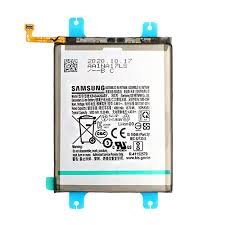
Vivo Y29 Battery Replacement
Availability:In Stock!
-
Vivo Y29 Battery Replacement
-
High-quality battery
-
Long-lasting performance
-
Safe and reliable
-
Compatible with Vivo Y29
-
Restores original backup
KSh 1,500.00
CompareVivo Y29 Battery Replacement Description
The Vivo Y29 is equipped with a lithium-ion battery, which is known for its efficiency and longevity in powering mobile devices. This battery typically offers a capacity of approximately 2000 mAh, allowing users to enjoy an average usage time of around one day on a full charge. However, like all rechargeable batteries, the Vivo Y29’s battery may experience a decline in performance over time, especially with regular use.
Users may notice various signs that indicate their battery is failing. Common symptoms include rapid discharge, where the battery depletes much more quickly than it did when new, and swelling, which poses a safety hazard and should not be ignored. Additionally, overheating during charging or while using the device might suggest that the battery is no longer functioning optimally. These issues often lead to the necessity for a battery replacement to restore the functionality and safety of the device.
It is critical to consider the source of replacement batteries when the need arises. Utilizing genuine or high-quality replacement batteries for the Vivo Y29 not only ensures compatibility but significantly impacts the longevity and performance of the smartphone. Genuine batteries are designed specifically for the device, minimizing the risk of complications such as overheating or damage to internal components. Furthermore, low-quality batteries may lead to further issues, making it imperative for users to prioritize quality and safety when seeking a replacement. Understanding the intricacies of the Vivo Y29 battery, including its specifications, lifespan, and potential issues, will enable users to make informed decisions regarding their device maintenance.
Tools and Materials Needed for Replacement
Replacing the battery of your Vivo Y29 requires a well-organized approach and the right tools to ensure a smooth and safe process. Before starting, gather the necessary tools to avoid interruptions during the replacement. The essential tools include a Phillips screwdriver, a plastic prying tool, and an anti-static wrist strap. A Phillips screwdriver will be used to remove the screws that secure the device, while a plastic prying tool helps carefully detach the back cover without damaging it. Additionally, an anti-static wrist strap is crucial for preventing electrostatic discharge, which can damage sensitive electronic components.
In terms of materials, you will need a compatible replacement battery for your Vivo Y29. It is advisable to acquire this battery from authorized dealers or reputable online platforms. Purchasing from authorized suppliers not only ensures you receive a component that meets quality standards, but it also enhances safety and device performance. When selecting a replacement battery, ensure that it matches the original specifications in terms of voltage and capacity to guarantee optimal functionality.
While handling the tools and electronic components, follow basic safety precautions. Always power off the device before starting the disassembly process to prevent any accidental short-circuiting. Additionally, work in a clean, dry environment to minimize the risk of dust and moisture damaging the internal parts of your phone. Taking these precautions not only protects your device but also contributes to a safer battery replacement experience.
Step-by-Step Battery Replacement Process
Replacing the battery in your Vivo Y29 can seem daunting, but by following these step-by-step instructions, you can safely execute the task with ease. Begin by ensuring that your device is powered off. Hold down the power button for a few seconds and select the ‘Power Off’ option on the screen. Once the device is completely shut down, you can proceed to the next step.
Next, carefully remove the back cover of your Vivo Y29. To do this, use a small plastic tool or your fingernail to pry the back cover away from the device. Start at one corner and gently work your way around. Be cautious during this process to avoid damaging the clips that hold the cover in place.
Once the back cover is removed, locate the battery. You will see a connector that attaches the battery to the motherboard. Carefully disconnect the old battery by gently pulling the connector from the socket. It is essential to handle the components delicately to prevent any damage to the internal circuitry. As you remove the battery, be mindful of any adhesive that might be holding it in place, and consider using an appropriate tool to loosen it if necessary.
Now it is time to install the new battery. Position the new battery in the same orientation as the old one and firmly connect the battery’s connector back to the motherboard. Ensure that it is securely attached to avoid connectivity issues.
Before reassembling your device, it’s critical to test the new battery. Power on your Vivo Y29 and check for any signs of functionality, such as the device booting up and charging properly. Once confirmed, reattach the back cover by aligning it properly and pressing it securely into place. This step will safeguard your new battery and ensure the overall performance of your Vivo Y29 is restored effectively.
Post-Replacement Care and Maintenance
After successfully replacing the battery of your Vivo Y29, implementing appropriate care and maintenance practices is crucial to enhancing battery longevity and performance. One of the fundamental aspects of battery health management is establishing proper charging habits. It is advisable to use the original charger provided with the device to ensure optimal charging conditions. Frequent overcharging can result in battery degradation; therefore, unplugging the device once it reaches full charge is recommended. Additionally, try to avoid letting the battery drain completely before recharging, as this can adversely affect the overall lifespan of the lithium-ion battery.
Another important consideration is temperature management. Lithium-ion batteries, such as those used in the Vivo Y29, perform best at moderate temperatures. It is recommended to keep the device away from extreme heat or cold, as these conditions can negatively impact battery performance. For instance, leaving the phone in a hot car or exposing it to direct sunlight for prolonged periods can lead to excess heat, which may cause premature battery failure. Conversely, exposing the device to freezing temperatures can also shorten battery life and efficiency. Therefore, maintaining a temperature range between 20°C to 25°C (68°F to 77°F) is ideal.
Monitoring your usage patterns is equally essential. Be aware of apps and processes that consume excessive battery energy, as they can lead to faster battery depletion. Regularly reviewing settings, such as background app refresh and location services, can help conserve battery life. In cases of unusual battery behavior, such as swelling or overheating, it is imperative to seek professional assistance quickly. Lastly, when it comes to disposing of the old battery, consider responsible recycling options. Many electronic retailers or local recycling centers provide proper disposal methods for lithium-ion batteries, ensuring environmental safety while promoting sustainability.



NelsonGrigo –
medicine from mexico FronteraCare Direct mexico prescription online
NelsonGrigo –
JamesNof –
online drug: online medicine websites – prednisone cost in india
JamesNof –
Zacharyhanna –
online medicine booking: ZenithIndus Rx – buy drugs from india
Zacharyhanna –
JamesNof –
drugs from india: ZenithIndus Rx – medications from india
JamesNof –
BryanGop –
https://zenithindusrx.com/# india rx
BryanGop –
Zacharyhanna –
online drugs order: ZenithIndus Rx – buy medicine online
Zacharyhanna –
BryanGop –
https://fronteracaredirect.com/# farmacias mexicanas
BryanGop –
Zacharyhanna –
medicine purchase: ZenithIndusRx – meds from india
Zacharyhanna –
BryanGop –
http://zenithindusrx.com/# best online medicine store
BryanGop –
Zacharyhanna –
buying prescriptions in mexico: FronteraCareDirect – farmacia mexicana en linea
Zacharyhanna –
BryanGop –
https://fronteracaredirect.shop/# prescriptions from mexico
BryanGop –